Automated Rollbacks in Kargo 1.11: Automatic Recovery When Verification Fails
Heba Eid

Launched in Kargo 1.11: automated rollbacks return a stage to its last verified Freight without human intervention. When verification fails, the controller creates a new promotion targeting the known-good version, and the affected environment recovers in seconds rather than waiting for someone to notice, diagnose, and act.
We recently held a webinar to share automated rollbacks, a feature released as part of Kargo Enterprise 1.11. In this webinar, Jesse Suen, co-creator of Argo CD and Kargo and co-founder and CTO at Akuity, demonstrated key features, use cases, and demos of automated rollbacks and answered questions from the Kargo community, with Irina Belova, Senior Product Marketing Manager at Akuity, hosting the session.
From that session, this post covers how the feature works, how to turn it on, and some of the questions attendees asked. The demo and full recording are near the end.
Before we dive into Kargo 1.11 and automated rollbacks, here's some background on Kargo itself.
What Is Kargo?
Kargo is a multi-stage GitOps continuous promotion tool. It sits above deployment tools such as Argo CD and Terraform, and it controls how an artifact moves from dev to production.
Kargo complements Argo CD rather than replacing it. Argo CD reconciles a cluster against a Git repository, and Terraform reconciles infrastructure against its configuration, but neither tool models a deployment pipeline, and neither writes to Git on its own. Something has to make the commit that moves a version from one environment to the next. That job has historically fallen to CI scripts, an image updater, or an engineer opening pull requests by hand. Kargo does it as a first-class operation, with the promotion history recorded in Git.
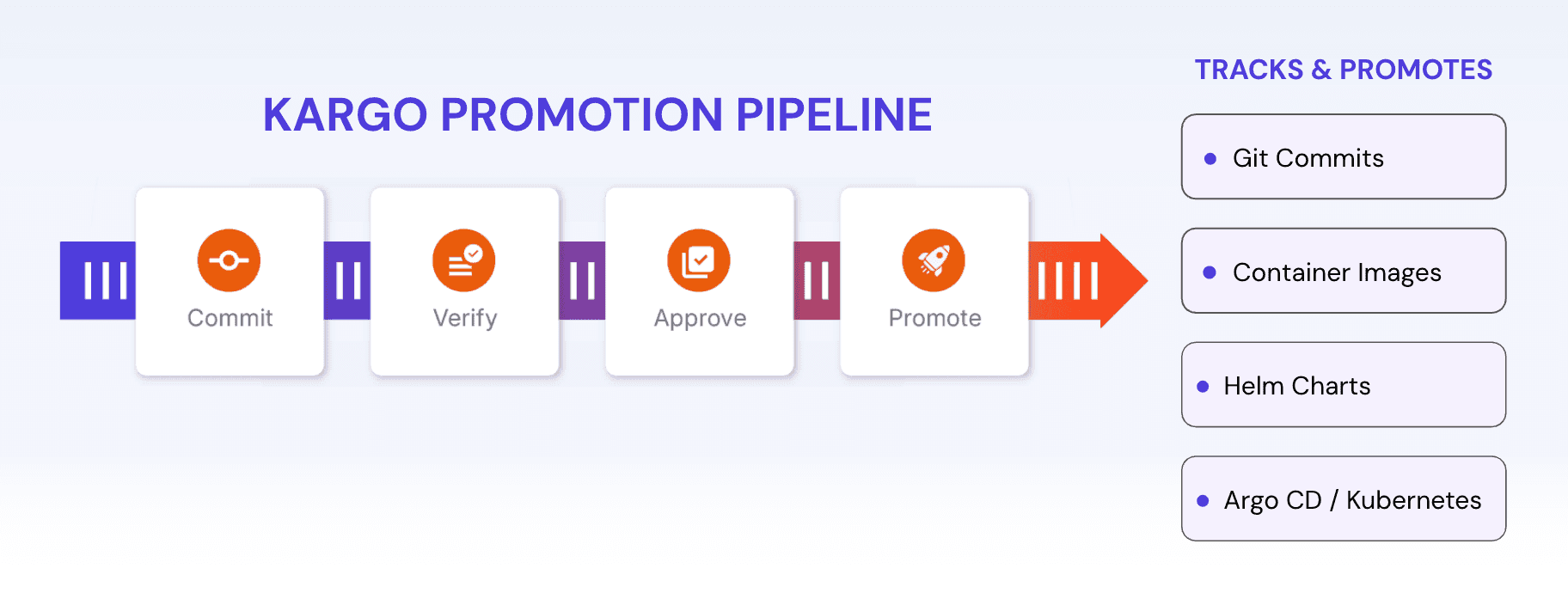
Figure: Kargo Promotion Pipeline
Kargo Core Concepts: Warehouses, Freight, Stages, and Verification
Five concepts carry most of the weight in a Kargo pipeline.
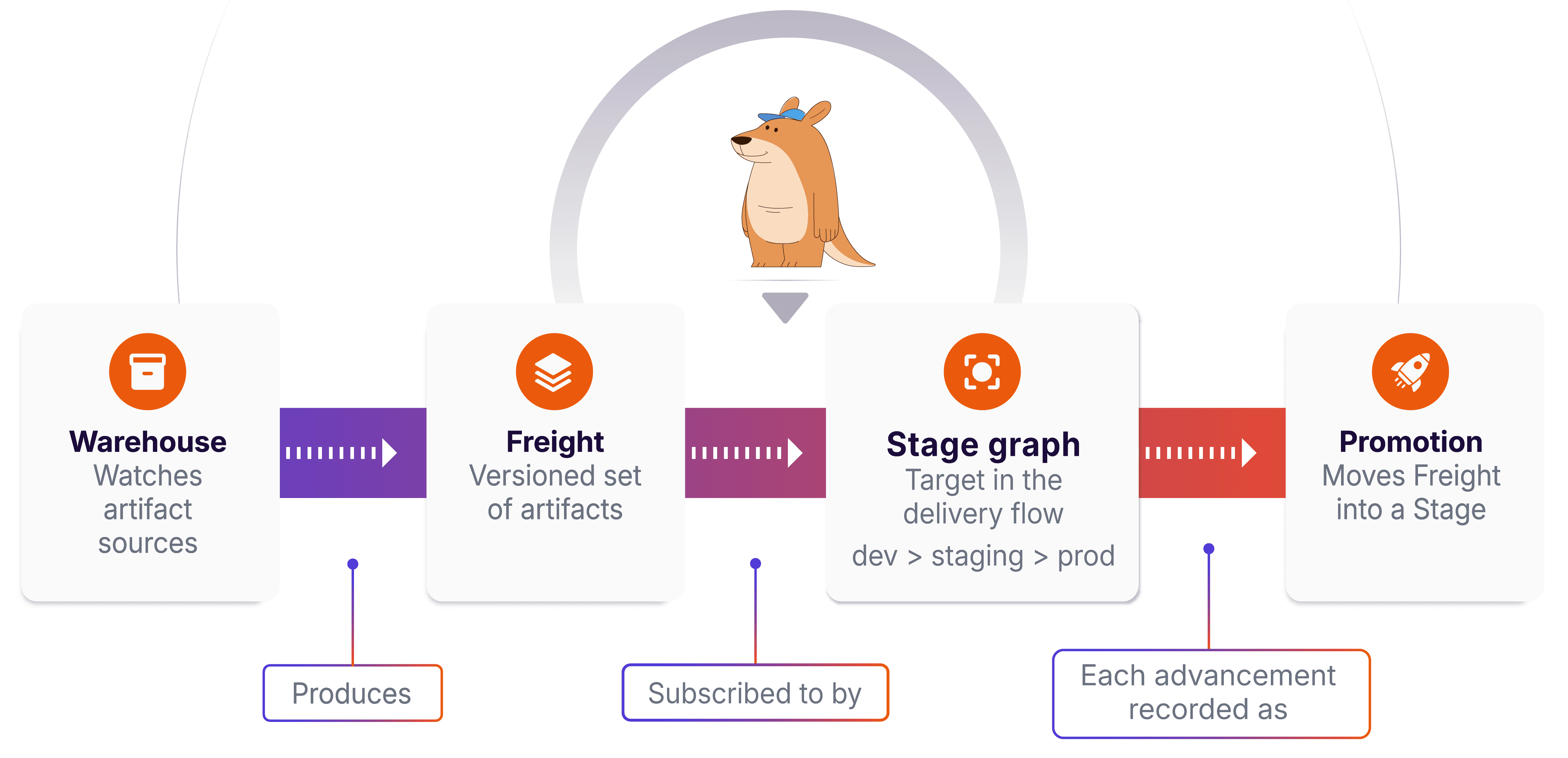
Figure: Kargo Core Concepts
Warehouses are the artifact sources Kargo monitors: OCI image registries, Helm chart repositories, and Git repositories.
Freight is the unit that moves through the pipeline. Freight can bundle several artifacts together, such as a container image, a Helm chart, a Git config, and a Lambda function, all versioned and promoted as a single unit.
Stages are the environments Freight passes through, in a defined order. A stage may cover a single Argo CD Application, several Applications, or a mix of Kubernetes and non-Kubernetes targets.
Promotion moves Freight into a stage, executed as a sequence of steps defined per stage. Promotion steps typically clone a GitOps repository, update a manifest or values file, commit, and push.
Verification runs after every promotion. Verification covers the validation checks that confirm a stage is healthy before a release proceeds downstream: querying Prometheus, Datadog, or New Relic for golden signals such as HTTP error rates, or running functional tests against the live environment.
Verification is the concept automated rollbacks build on.
What Are Automated Rollbacks in Kargo?
An automated rollback is a promotion that Kargo creates on its own, targeting a stage's last verified Freight, in response to a failed verification or promotion. The rollback promotion runs the same promotion steps as any manual promotion. Nothing about the execution path is special: the difference is what triggered the promotion and which Freight it targets.
Before 1.11, verification could stop bad Freight from moving downstream, but the stage it had already landed in stayed on the failing version until an engineer promoted an older version. Automated rollbacks close that gap.
How Does Kargo Decide What to Roll Back To?
Each time Freight passes verification in a stage, Kargo records that Freight name in the stage's metadata as its stable Freight. That record is the rollback target.
Kargo tracks stable Freight per warehouse origin, not per stage. A stage subscribing to three warehouses carries three stable Freight records. When verification fails, the rollback controller identifies the origin implicated in the failure and issues a rollback for that origin alone, leaving the stage's other freight requests untouched.
How to Enable Automated Rollbacks in Kargo
Automated rollbacks require Kargo Enterprise 1.11 or later. Enabling the feature takes a single addition to the project config, alongside the promotion policies most projects already have. Jesse's summary on the call: adding the rollback setting with empty braces turns it on for whichever stages the policy selects, and that is all that is required to get started.
Scoping works through the same stage selectors auto-promotion policies already use, including exact names, patterns, and label selectors, so narrowing the feature to a subset of stages introduces no new syntax to learn.
Rolling out to a single non-production stage first is the safer sequence. Stages that have never passed verification have no stable Freight and therefore no rollback target, so enabling the feature on a stage in an unknown state produces no rollback at all rather than an error.
The auto-rollback documentation covers the full configuration reference.
Kargo Automated Rollbacks vs. Argo Rollouts: What's the Difference?
Both tools revert to a known-good state after analysis fails, and they operate at different levels of the stack.
Argo Rollouts operates at the individual workload level, functioning as a Deployment replacement managing a stable ReplicaSet and a canary. A Rollout cannot revert a ConfigMap, coordinate across several Argo CD Applications, or touch anything outside Kubernetes.
Kargo's automated rollbacks operate at the stage level. A stage may comprise multiple resources, multiple Argo CD Applications, or a combination of Kubernetes and non-Kubernetes targets. The demo pipeline promoted a container image alongside a Lambda function deployed through Terraform, and the rollback reverted both.
Table: Argo Rollouts vs Kargo Automated Rollbacks
Argo Rollouts | Kargo Automated Rollbacks | |
|---|---|---|
Scope | Single workload | Stage |
Reverts | ReplicaSet for one Deployment | Every resource the stage's promotion steps touch |
ConfigMaps | No | Yes |
Multiple Argo CD Applications | No | Yes |
Non-Kubernetes targets | No | Yes, including Terraform |
Traffic shaping | Yes, via Ingress or Gateway API | No |
The two are complementary rather than competing, and Kargo does not replace Argo Rollouts. Traffic shaping remains exclusive to Rollouts: gradually shifting traffic weight by modifying an Ingress or Gateway API object has no equivalent in Kargo. Teams running progressive delivery should keep Rollouts for the traffic layer and add Kargo for stage-level recovery.
Demo: A Failed Release Rolling Back
Jesse Suen demonstrated the feature on a pipeline promoting two artifacts as a single unit: a container image alongside a Lambda function deployed through Terraform.
The setup used a test app familiar to Argo Rollouts users. It sends a continuous stream of requests to a backend and color-codes each response by the version that served it, with a histogram sampling requests by version over time. Verification ran an analysis template against a Prometheus instance inside the cluster, calculating the ratio of HTTP 500 responses to total requests. The version being promoted was built deliberately to return a high error rate.
The sequence ran as follows:
The new version was promoted into staging. The test app began showing the new color, with red outlines marking error responses.
The analysis run picked up the elevated 500 rate and verification failed.
Kargo created a second promotion, the rollback, targeting the stable Freight.
The test app returned to the previous version's color.
Three outcomes followed from one failure. The faulty Freight was blocked from moving downstream, production stayed clean, and the affected environment recovered without anyone touching it.
Jesse also demonstrated the interaction with auto-promotion on a second pipeline, promoting Freight that passes verification in dev but fails in staging. Staging auto-promoted the new Freight, verification failed, the rollback fired, and the pause indicator appeared on the stage's auto-promotion lightning bolt, showing the hold in place.
Both scenarios are covered in full in the recorded session below.
Watch the Full Session
Common Questions About Automated Rollbacks
Can a Deployment That Included a Database Migration Be Rolled Back?
A rollback promotion runs the same steps as a roll-forward promotion, so the general practice is to make promotion steps idempotent and safe to run in both directions. Database migrations resist that treatment.
For steps that cannot run in reverse, Kargo 1.11 added a way for a promotion step to detect that it is running as part of a rollback. Gating a migration step on that condition keeps the migration on the roll-forward path and skips it on the way back. The same mechanism works in the other direction, firing a notification on rollbacks that would not go out on a normal promotion. The promotion steps documentation covers the syntax.
How Can Rollbacks Below a Minimum Version Be Prevented?
Kargo has no built-in version floor. The available pattern combines a step that deliberately fails the promotion with a condition comparing the Freight version against a minimum. Freight below the floor fails the promotion before any step executes.
Is There an Audit Trail for Automated Rollbacks?
Open source Kargo records promotions and rollbacks as Kubernetes events, which Kubernetes garbage-collects after a few hours by default. That retention window is too short for change management review.
The Akuity Platform persists these as audit events with long-term retention, covering months or years of promotion history. Rollback events record that the promotion was created by the controller rather than by a user, so the audit log distinguishes automated recovery from human action without additional instrumentation.
Will a Rollback Conflict with Argo CD Self-Healing?
No. Self-healing and auto-sync activate when live state diverges from the desired state recorded in Git. A Kargo rollback commits and pushes to the GitOps repository as part of its promotion steps, so desired state moves along with the rollback and no divergence exists for Argo CD to correct.
Does Kargo Work with ApplicationSets and App-of-Apps?
Yes. Kargo's Argo CD update step originally required naming a specific Application. Label selection, added two releases before 1.11, allows a promotion step to update every Application carrying a given label, which matches how ApplicationSets label their generated Applications. The wait step supports labeled Applications as well.
How Does Kargo Handle Terraform Rollbacks?
Managing Terraform through Kargo is coordination, not a circular dependency. Dedicated Terraform steps handle the apply, and the promotion sequence in the demo ran as follows:
A rollback reruns this sequence against older Freight, including the Terraform apply. Infrastructure changes revert alongside application changes, which Argo Rollouts cannot provide.
What's Next for Kargo
Kargo Enterprise builds on open-source Kargo with promotion beyond Kubernetes to Terraform and VM targets, DORA metrics covering deployment frequency, lead time, and MTTR, audit reporting, and SSO and RBAC.
Two governance features are coming soon.
Approval policies will require sign-off before a promotion proceeds.
Promotion windows will automatically enforce change-freeze periods.
Both address the same gap that automated rollbacks address from the other direction: approval policies and promotion windows control when a promotion may start, while automated rollbacks handle what happens after one fails.
See continuous promotion in action: book a demo, or spin up the Kargo Quickstart on a local cluster and try it for free.
Further Reading and Resources
Auto-rollback documentation: technical documentation on how to set up automated rollbacks
Continuous Promotion with Kargo: A complete guide on continuous promotion with Kargo
Kargo Quickstart: build a Warehouse and Stage on a local cluster and promote a first change
Kargo on GitHub: source, issues, and release history (Apache 2.0)
Kargo Discord: Community support channel
Kargo Enterprise: The managed platform and its enterprise capabilities
The Promotion Layer GitOps Was Missing: The Rise of Kargo: origin story and adoption examples
Enterprise GitOps: Multi-Environment Delivery & Promotion: On-demand webinar and demo.
