Argo CD: The Complete Guide to GitOps
SHARE ARTICLE


Argo CD is an open-source, Kubernetes-native continuous delivery controller that makes Git the source of truth for cluster state. It watches configuration in Git, compares it against live clusters, and continuously reconciles the two, so deployments become traceable commits and configuration drift is detected without anyone watching for it. This guide is for platform teams and DevOps engineers adopting Argo CD to standardize Kubernetes delivery across clusters and environments. It covers the core concepts and architecture, how sync and drift policies behave, which deployment model fits a given fleet, what running Argo CD in production actually requires, and how Argo CD compares to Flux, traditional CI/CD, and the rest of the Argo project family.
What Is Argo CD?
Argo CD is a declarative, GitOps continuous delivery tool for Kubernetes. It keeps live cluster state aligned with configuration stored in Git: teams declare what should run through commits and pull requests, and Argo CD watches those repositories, compares them against target clusters, and reports or corrects any differences.
Argo CD was created at Intuit by Alexander Matyushentsev, Hong Wang, and Jesse Suen, who later founded Akuity and built Kargo. Argo CD graduated from the CNCF in 2022 and is licensed under Apache 2.0.
It is now the standard tool for GitOps on Kubernetes. The 2026 Argo CD User Survey found that 66% of respondents had run Argo CD in production for more than two years, giving the project a Net Promoter Score of 73.
Argo CD follows GitOps principles. Cluster configuration lives in Git, and a controller continuously reconciles the live cluster against it, so it detects deviations from manual changes, failed deploys, or unauthorized mutations. Git history becomes the audit trail, and configuration rollback becomes a revert, though stateful changes such as schema migrations still need their own recovery path.
To learn more about GitOps and GitOps best practices, read GitOps Best Practices: A Complete Guide for Modern Deployments.
What Problems Does Argo CD Solve?
Kubernetes reconciles live resources against the spec stored in the cluster, but nothing keeps that stored spec aligned with Git. As teams add clusters, environments, and contributors, three delivery anti-patterns fill that gap:
CI-driven kubectl apply: A pipeline authenticates to the cluster, applies manifests, and exits, leaving partial state on failure and requiring CI systems to hold production credentials.
Manual production access: A hotfix applied directly to the cluster resolves the incident but leaves no review history, no audit trail, and no durable rollback path.
Configuration drift: Helm and Kustomize render manifests but never verify that live resources still match them.
How Does Argo CD Work?
Argo CD connects a Git repository to one or more Kubernetes clusters through a resource called an Application, which declares a source (repository, path, revision) and a destination (cluster, namespace). Everything else follows from that pairing.
Argo CD keeps the cluster in sync with Git through a reconciliation loop: a cycle that repeats on a schedule, comparing what Git declares with what is actually running and closing the gap. Need a cluster to try this on? Follow our guide to set up a test Kubernetes cluster from scratch. Each pass runs four steps:
Fetch and render. Argo CD pulls the configuration from Git and renders it into plain Kubernetes manifests, whether the source is Helm, Kustomize, Jsonnet, or raw YAML.
Compare. It queries the target cluster for the live state of those resources and diffs the two.
Report. It records whether the application is
SyncedorOutOfSync, and separately whether it isHealthy,Progressing, orDegraded.Act. Depending on the sync policy, it waits for operator approval or applies the Git-declared state itself. Resources deleted from Git can be pruned on the same policy.
Because the loop is pull-based, deployment is separated from CI. CI builds and tests artifacts, updates the configuration repository, and stops there. Argo CD detects that approved change and reconciles it, so no pipeline holds cluster credentials and no external system needs access to the Kubernetes API server.
Argo CD Core Concepts: Applications, AppProjects, and Sync Policies
Argo CD uses a small set of Kubernetes-native primitives to define what should run, where it can run, and how it should be reconciled. These primitives define the GitOps boundaries platform teams set up first.
Applications
An Application is Argo CD’s core custom resource. It defines the desired source of truth—usually a Git repository, path, and target revision—and the deployment destination, including a cluster and namespace.
Argo CD renders that source, compares it with the destination, and records whether the application is synced and healthy. An application can represent a single service, a platform component, or a related set of Kubernetes resources managed together.
AppProjects
An AppProject is Argo CD’s governance and multi-tenancy boundary. Every Application belongs to a project, which restricts the repositories it can use, the clusters and namespaces it can target, and the Kubernetes resource types it can create.
For example, a team can be allowed to deploy only from its own repository into its own namespace, while being blocked from creating cluster-scoped resources. Combined with RBAC, AppProjects give platform teams a practical least-privilege model.
Sync, Refresh, and Health Status
A refresh checks Git and the target cluster for the latest desired and live state; it does not change the cluster. A sync applies the Git-declared state to the destination and can also prune resources removed from Git.
Argo CD tracks two separate signals. Sync status shows whether live resources match the desired state, while health status shows whether those resources are functioning correctly. An application can be synced but degraded, such as when a Deployment is applied successfully but its Pods are crash-looping.
ApplicationSets and App of Apps
ApplicationSet is a controller that generates Application resources from templates and generators. It is useful when the same workload must be deployed repeatedly across clusters, namespaces, directories, or environment combinations.
App of Apps is a bootstrap pattern in which one root Application points to a Git directory containing child Application manifests. It works well for small and medium fleets, while ApplicationSets are usually easier to standardize for larger, more dynamic deployments.
These primitives describe what to reconcile and where. The components that carry out that reconciliation sit one layer below them.
Argo CD Architecture and Core Components
A small set of control-plane services implements the reconciliation loop, each responsible for a different part of authentication, manifest generation, state comparison, and synchronization.

Figure: Argo CD Architecture and Core Components
API Server: The front door for the Argo CD UI, CLI, and API clients. It handles login, RBAC authorization, application operations, repository and cluster registration, and exposes the current sync and health status of managed applications. You can also restyle the Argo CD UI to match your brand. Here's how to create an Argo CD theme with minimal CSS.
Repository Server: Fetches configuration sources and renders them into manifests. It supports plain YAML, Helm, Kustomize, Jsonnet, and configured plugins, then returns the rendered desired state that Argo CD will compare against the live cluster.
Application Controller: The core reconciliation engine. It watches Application resources, compares the desired state from Git with the live state in the target cluster, calculates drift, updates sync and health status, and executes sync, prune, and self-healing actions based on policy.
Redis: Argo CD's cache. It stores rendered manifests, cluster resource trees, and other derived state so the repository server and application controller avoid repeating expensive Git and Kubernetes API work.
Dex: An optional identity broker bundled with Argo CD. Argo CD supports OIDC natively, so providers that speak OIDC — Okta, Entra ID, Auth0, Keycloak, Google — should be wired directly to the API server without Dex in the path.
Sync Policies, Drift Detection, and Self-Healing
Sync policies determine how Argo CD responds when Git and the live cluster differ. Platform teams can require a manual sync for every change, enable automated sync when Git changes, or add pruning and self-healing to enforce Git as the authoritative state.
Manual and Automated Sync
With manual sync, Argo CD detects and reports an OutOfSync application, but an operator must approve the reconciliation. This is useful for high-risk production workloads or teams introducing GitOps gradually.
With automated sync, Argo CD applies a new desired state when it detects a Git change. CI still builds and tests artifacts; it updates the configuration repository, and Argo CD reconciles that approved revision into the target cluster.
Drift Detection
Drift occurs when live Kubernetes resources no longer match their Git-declared configuration. It can result from direct kubectl edits, failed deployments, admission controllers, or other automation acting outside the GitOps workflow.
Argo CD continuously compares rendered manifests with live resources and marks affected applications OutOfSync. That gives teams a clear view of where the running cluster has diverged before deciding whether to investigate, accept, or revert the change.
Self-Healing and Pruning
Self-healing automatically restores resources that have been changed outside Git, returning them to the desired state when Argo CD detects drift. Pruning removes resources that still exist in the cluster after being deleted from Git.
Both controls strengthen GitOps, but they should be enabled deliberately. Self-healing is generally appropriate for stateless application resources, while stateful workloads, shared infrastructure, and resources modified by other controllers may need more selective policies or manual review before reconciliation. The syncPolicy configuration options are covered in more depth in Akuity's guide to sync and drift detection. See How GitOps Sync and Drift Detection Work to learn more.
Argo CD Deployment Architectures
An Argo CD architecture describes how instances and components are distributed across the Kubernetes clusters they manage. That choice determines where control planes, credentials, application controllers, and API connections live, which shapes scalability, security, operational overhead, and developer experience.
Single Instance (Hub-and-Spoke)
One Argo CD instance runs on a dedicated management cluster and deploys remotely to every other cluster in the fleet, with one control plane, one UI, and one API endpoint, while the workload clusters — the spokes — run no Argo CD components of their own.
Per-Cluster
A full Argo CD instance runs inside every cluster and deploys only to that same cluster, with no external control plane and no central instance, so each cluster is fully self-contained.
Hybrid (Instance Per Logical Group)
The hybrid model sits between the other two, running one Argo CD instance per logical group of clusters — grouped by team, region, environment, or whatever division already makes sense internally — rather than one for the whole fleet or one for every cluster.
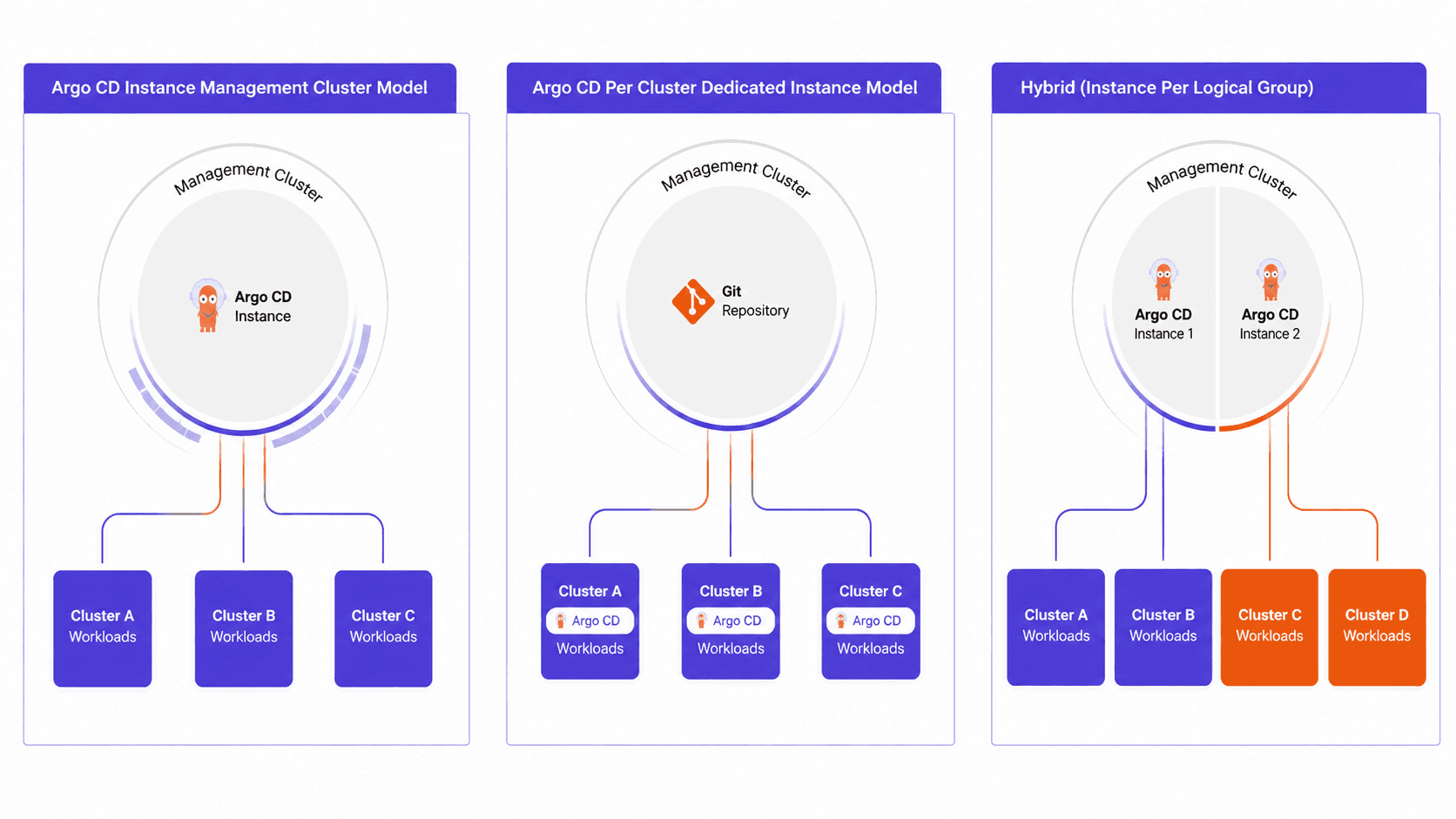
Figure: Argo CD Architectures
Agent-Based (Akuity Platform)
An agent-based architecture reverses the connection direction, running an agent inside each managed cluster with outbound access back to the control plane, so no management cluster holds kubeconfigs for the fleet and no cluster needs to expose its API server externally.
For a deeper guide to choosing among these architectures, see Akuity’s breakdown of Argo CD deployment models.
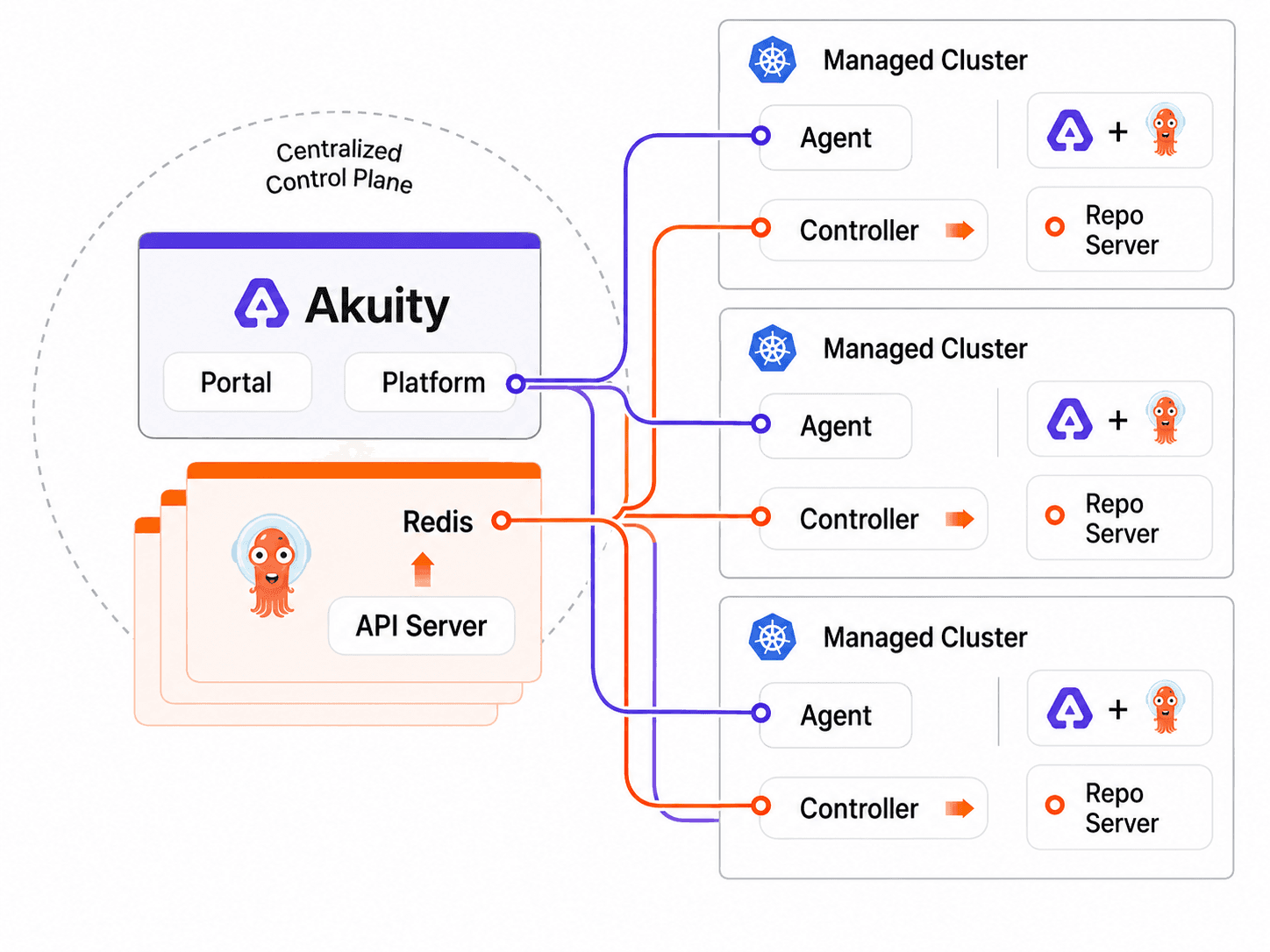
Figure: Akuity's Agent-Based Architecture
Argo CD vs. Other Tools
Argo CD is usually evaluated against three different things: another GitOps controller, a traditional CI/CD tool, or one of the other projects that share the Argo name.
Argo CD vs. Flux
Flux is an open-source GitOps tool that implements the same core GitOps principles. The difference between Argo CD and Flux is architecture.
Argo CD ships as an integrated platform with a built-in web UI, centralized RBAC, and a single view across clusters. Flux is a modular toolkit of independent controllers that integrate directly with the Kubernetes API, favoring composability over a bundled interface.
For a full side-by-side across architecture, security, supply chain, scalability, and current adoption data, see Argo CD vs. Flux: which GitOps platform fits your team.
Argo CD vs. Flux and Traditional CI/CD
Argo CD does not replace Jenkins, GitLab CI, or GitHub Actions. It replaces the deployment stage inside them.
CI tools are built for synchronous, short-lived tasks: build, test, publish an artifact, exit. Deployment is asynchronous and continuous, and it needs to keep enforcing state long after the pipeline finishes. Using a CI job to deploy means the pipeline holds cluster credentials, and nothing verifies the cluster afterward. Argo CD takes over at the point where the artifact is built and the configuration repository is updated.
Argo CD vs. Argo Workflows, Rollouts, and Events
Argo CD, Argo Workflows, Argo Rollouts, and Argo Events are four separate projects under the Argo umbrella, not features of one product. Argo CD handles GitOps delivery. Argo Workflows is a container-native workflow engine for multi-step, parallel jobs. Argo Rollouts provides progressive delivery strategies such as canary and blue-green, and pairs directly with Argo CD (covered below). Argo Events is an event-driven dependency manager that triggers workflows and other actions.
They are commonly used together but adopted independently. For a fuller introduction, see what is the Argo Project.
How Argo CD works with Argo Rollouts and Kargo
Argo CD reconciles a cluster to the version declared in Git. Two questions sit outside that scope: how a new version reaches users, and when a version is allowed to move to the next environment. Argo Rollouts answers the first, Kargo answers the second.
Argo CD with Argo Rollouts
Argo Rollouts controls how a new version reaches users, replacing a standard Kubernetes Deployment with a Rollout resource that supports canary and blue-green strategies.
Argo CD syncs the Rollout manifest; Argo Rollouts then shifts traffic gradually, evaluates configured metrics, and can pause, promote, or roll back the release. Argo CD reads Rollout health states, so a progressing, paused, or degraded rollout is visible in the application status.
Use Argo Rollouts when a deployment requires controlled exposure and automated validation. For routine workloads where a standard rolling update is sufficient, Argo CD alone is simpler.
For a walkthrough of both strategies, see automating blue-green and canary deployments.
Argo CD with Kargo
Sync and promotion are distinct concerns. Sync is deterministic; promotion is conditional. A new image tag should only reach production if tests passed, staging has been healthy for a defined period, and someone approved it. Baking that logic into a sync controller produces brittle pipelines.
Kargo is a continuous promotion system that manages the flow of artifacts through a sequence of environments. Built by the same team behind Argo CD, it monitors artifact sources, evaluates promotion policies, and writes the resulting configuration updates to Git. Argo CD then detects those commits and executes the sync.
Use Kargo when changes move through multiple environments with conditions attached. Kargo decides whether to promote; Argo CD executes what Kargo writes.
For how promotion works in practice, see continuous promotion with Kargo and the promotion layer GitOps was missing.

Figure: How Argo CD Works with Kargo
Self-Managed vs. Managed Argo CD
With self-managed Argo CD, platform team operates the control plane: installation, upgrades, scaling, high availability, security patching, backups, and incident response. It provides maximum control and is often a strong fit for teams with established Kubernetes platform expertise.
A managed offering removes much of that operational burden by running and maintaining the control plane. Akuity, founded by the creators of Argo CD, manages provisioning, scaling, upgrades, and security patching, while its agent-based architecture keeps application controllers close to managed clusters and avoids storing kubeconfigs for the fleet in a central management cluster.
Choose self-managed when control-plane ownership, on-premises requirements, or deep customization matter most. Consider managed Argo CD when fleet scale, multi-cluster operations, reliability, and reducing platform overhead matter more.
Ready to Run Argo CD Without the Operational Overhead?
Argo CD is free to install and use. The ongoing cost is operational: upgrades, scaling, high availability, security patching, and incident response for the control plane
Akuity is built by the creators of Argo CD and Kargo. The Akuity Platform runs the control plane with an agent-based architecture that keeps kubeconfigs out of a central management cluster and application controllers close to the clusters they manage. Book a demo with an Argo CD expert today.

Argo CD documentation

Argo CD getting started guide


The Rendered Manifests Pattern (Enhancing GitOps Visibility and Control)
