Introducing the Akuity Agentic Control Plane and MCP Server
Jiacheng Xu

AI agents have changed how software gets written. A developer can start with an idea, ask an agent to build it, and get working code in minutes. But code isn't delivered when it's written. It still has to be deployed, promoted across environments, monitored, and rolled back when it fails. AI has accelerated code creation, but the bottleneck is testing, security review, and deployment.
Engineering teams have tried to fix this by handing an agent a kubeconfig, an API token, or CLI access, and letting it check production or make a change directly. It works, right up until you need to explain what the agent did and why. The agent operates outside your delivery platform, so nothing it does — a sync, a rollback, a manual patch — is visible to the controls your platform team put in place to catch it.
The scale of the problem is now measurable, and most organizations are behind. The 2026 CISO AI Risk Report — a survey of 235 CISOs and senior security leaders — found 71% already have AI tools accessing core business systems, but only 16% govern that access effectively, and 92% lack full visibility into AI identities altogether.
This isn't just a platform-team announcement, or just a CISO's problem. If you're in platform engineering, DevOps, or writing application code day to day, this changes how you work.
Today, we’re introducing the Akuity Agentic Control Plane and MCP Server. It connects your agent to the platform that already runs your deployments, so the agent can act on production, and every action it takes is bound by the same permissions, release checks, and audit trail that apply to the humans on your team.
Prefer to watch? Here's a 1-minute walkthrough of the Agentic Control Plane by Hong Wang, CEO and Co-Founder of Akuity.
The Agentic Control Plane in Action
The Akuity Platform manages the full application delivery lifecycle, equipping an agent with context on how an application is deployed, how a release moves between environments, and what controls must be satisfied before the next action. The same agent that writes the code can now check production health, trace an incident, deploy a build, or promote a release directly.
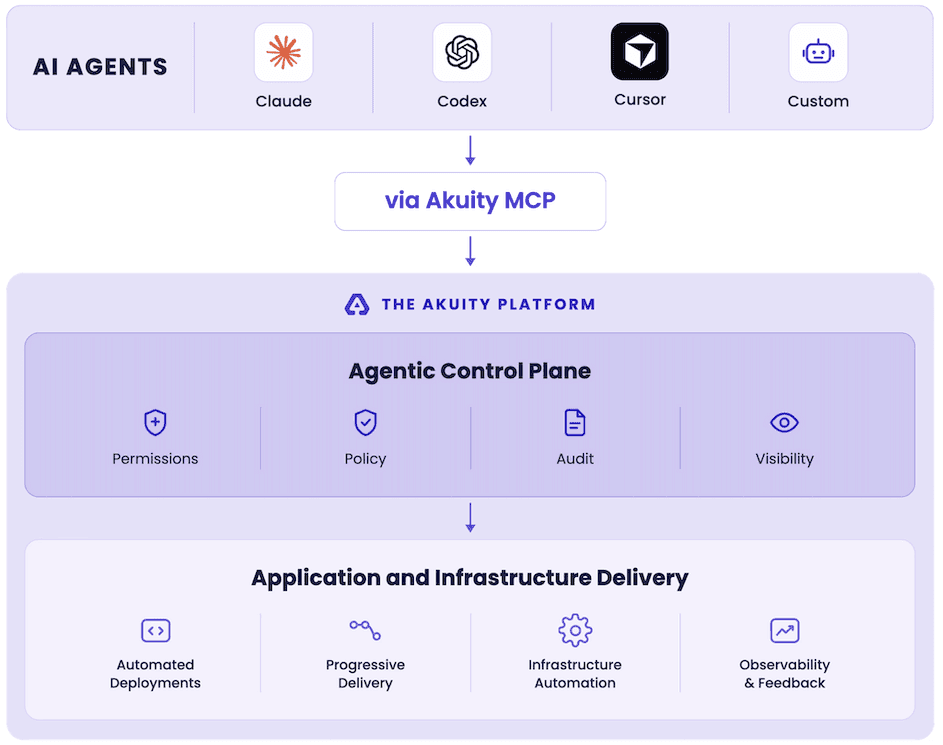
Figure 1: AI agents reach the Akuity Platform through the Akuity MCP Server. Every request passes through the Agentic Control Plane, where identity, permissions, release rules, and audit apply before any deploy, promote, or operate action runs.
Your agent reaches this through the Akuity MCP Server, the open interface to the Control Plane. It exposes Argo CD, Kargo, fleet insights — deployment history, running images, and Kubernetes changes across your clusters — and Akuity’s specialized agents as structured tools any MCP-capable client can call.
Akuity MCP is the interface; the Agentic Control Plane is the governed path behind it, where every request is authenticated as the specific user who connected the agent.
Here's what that looks like in practice:
Ask Questions Your Dashboards Can't Answer
For a VP of Engineering or anyone who'd normally ask someone else to check a dashboard: dashboards are useful when the question matches a view that already exists. Now you can ask the question in the form you actually have, then compose the required reads across instances and clusters.
For example:
"Which version of web is running in each production cluster?"
"Which container images in production have critical CVEs?"
"What changed in the 30 minutes before this incident started?"
The Control Plane resolves application state, deployment and promotion events, Kubernetes timeline data, image and CVE information, and audit records, and returns them through the MCP as structured results.
Troubleshoot an Incident Without Switching Between Tools
For DevOps and SRE teams: when an application becomes degraded, troubleshooting means moving between the Argo CD UI, Kubernetes events, workload logs, deployment history, and observability tools. Now an agent can gather the application's health, events, logs, and recent fleet timeline, correlate the signals, and identify the likely cause.
For example: "web-prod is degraded. Find out what changed, show the relevant evidence, identify the likely cause, and propose a fix."
The agent can validate any proposed fix with a server-side dry run before applying it, then sync, roll back, and patch.

Figure 2: A degraded application is handed to Akuity’s On-Call Agent, which checks recent events and workload logs against the configured runbook, finds a container being OOM-killed, and proposes a new memory limit. Nothing changes until a human approves it.
MLB: 100 Degraded Apps. Ten Minutes."Within hours of enabling Akuity's Agentic Control Plane, it identified more than one hundred degraded applications, and in under ten minutes, it flagged one project as the source of a systemic issue, traced it to the root cause and had a fix ready to go. That's exactly the workflow we wanted: identify the problem, tell us if it's systemic and hand us the fix. This is already bringing value to the team, and we are looking to expand its adoption." — Michael Goodness, Principal DevOps Engineer, MLB |
Promote Releases With the Controls You Already Use
For platform engineering teams managing release risk: deploying an application is not the same as safely moving it to production. Now an agent can inspect Kargo projects, stages, freight, and promotion history, then promote a release to the next stage — evaluated against the same eligibility checks and rules as a request from the UI or CLI.
For example: "Show me the changes in this release, check its promotion history, and promote it to production if it is eligible."
Onboard an Application From Your Development Environment
For application developers standing up something new: setting up a new application means learning how Argo CD and Kargo fit together, registering clusters, writing manifests, and building a promotion pipeline before the first release can move.
Now, you can describe the outcome instead: "Deploy ghcr.io/acme/web:1.4.0 to dev, staging, and production. Create the Argo CD applications, build a Kargo promotion pipeline, and commit the configuration to my repository."
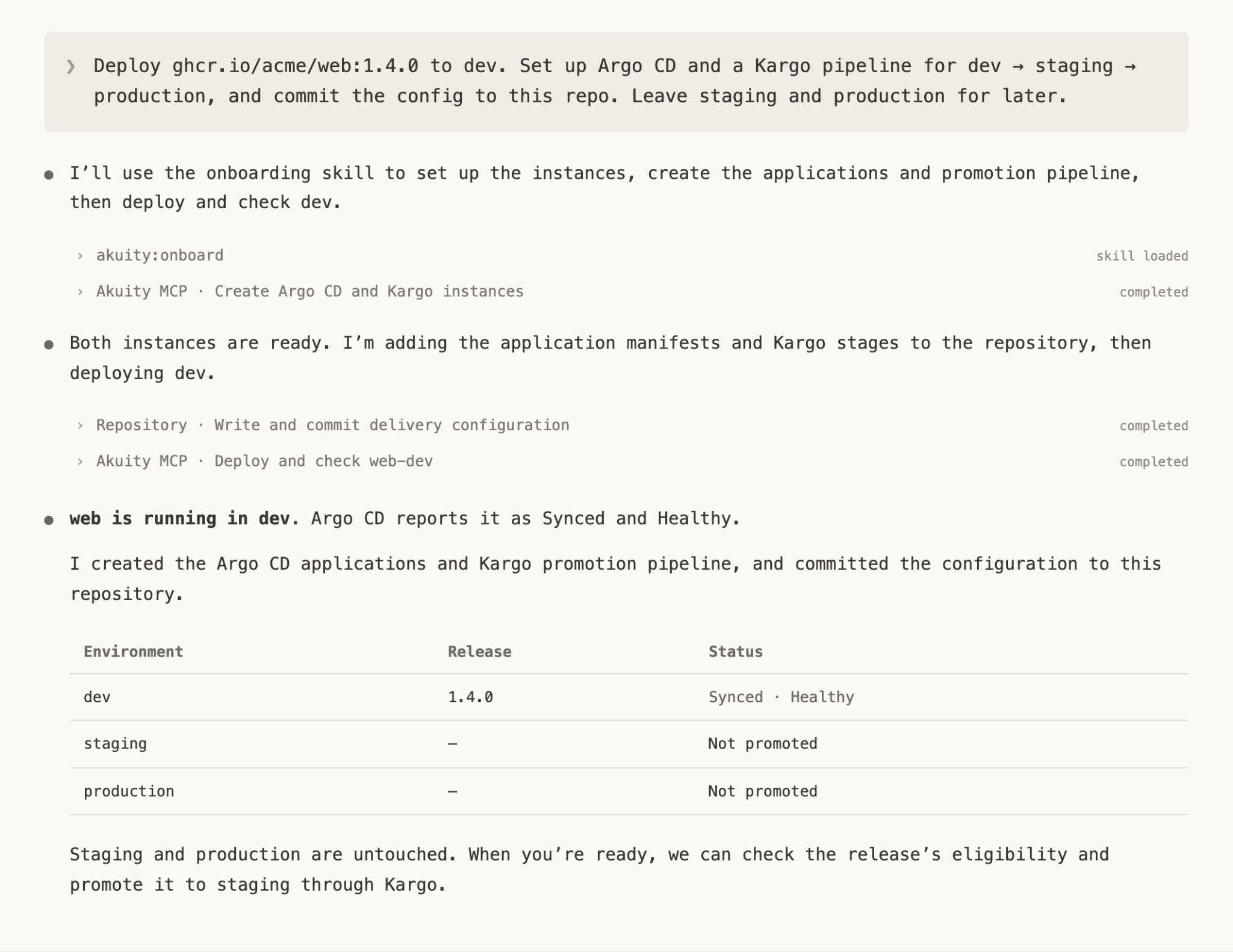
Figure 3: From a single prompt, the agent creates the Argo CD and Kargo instances, commits the delivery configuration to the repository, and deploys to dev. Staging and production stay untouched until a promotion is requested.
Watch the full demo and see the Agentic Control Plane in action.
What Sets Akuity's Agentic Control Plane Apart
Most ways of connecting an agent to production put a layer in front of the delivery pipeline. Akuity is the pipeline. Two things follow, and no external layer can match either:
The context is already there. Akuity runs every deployment, promotion, and rollback across the fleet, so the history, cluster health, and change lineage an agent needs to diagnose a real incident aren't data it has to go collect — they're records the platform already holds. A gateway or framework has to reconstruct all of that from the outside, and mostly can't.
The controls are already there. The agent inherits the identity and permissions of the operator who connected it, and the Argo CD and Kargo checks and promotion rules that govern releases apply unchanged. There is no second policy system to configure, keep in sync, or explain to an auditor.
With an open-source MCP server or an AI gateway, the agent's permissions live in one system and deployments live in another. With Akuity, they're the same system.
How Governance Is Implemented
An MCP endpoint gets an agent into production infrastructure, but the Agentic Control Plane governs what it does once it's there. A few of the core mechanisms:
Identity carries through every request: an Akuity user, an API key, or a login tied to a specific Argo CD or Kargo instance.
Permissions match the operator: an agent's access starts at Read-only, and can never exceed what the connecting person or API key is already allowed to do, even if an admin extends it to Read & write or Full access.
A record for every change an agent makes: changes made through MCP are recorded under the user or API key that authorized them and tagged as MCP actions in the audit log — filterable with Via MCP only.
Release and approval controls stay in place: Kargo checks and promotion rules apply whether a release is promoted from the UI, CLI, or an AI agent, and any action that requires approval stays pending until a user with the required permissions approves or rejects it.
Revoke access anytime: administrators can disable the platform endpoint, disable MCP access for one instance, or revoke the user or API credential used by a client.
Together, these controls mean an agent can never exceed what its operator is allowed to do, and every action is traceable to them.
Bring Your Agents into the Pipeline
Agents are already writing the code. The question was never whether they'd start touching delivery — it was whether they'd have the governance and context to do it well.
Whether that's answering a fleet-wide question, troubleshooting an incident, promoting a release, or standing up a new application, the same identity, permissions, and audit trail apply every time.
If your team wants to move faster without losing control of production, the Agentic Control Plane can get you there. The Akuity Control Plane is available in early access for selected organizations on Akuity Cloud. To request early access, contact your Akuity account team or support.
Get Started
Book a demo — we will map the Control Plane to your delivery setup.
Start a Free Trial — connect your first agent and keep every action inside the controls you already run.
Get Started with the Akuity Control Plane — a technical walkthrough of how to connect your first agent.
Watch the launch video — a walkthrough from Hong Wang, CEO and Co-Founder of Akuity.
See the full demo — an agent troubleshooting, promoting, and onboarding through the Control Plane.
Join the webinar — a live walkthrough with the team, plus Q&A.
Read the docs — how to connect a client, set agent permissions, and filter the audit log.
