GitOps Best Practices: A Complete Guide for Modern Deployments
Carolyn King

Written by Christian Hernandez. Originally published March 2025. Updated July 2026 by Carolyn King.
GitOps is the de facto standard for operating a cloud-native ecosystem with Kubernetes as the core orchestration layer. Kubernetes changed the game so thoroughly that conventional infrastructure-as-code tooling fell short, and management tools such as Argo CD and Flux emerged to work with Kubernetes' declarative nature.
As creators of Argo CD, long-time GitOps practitioners, and Kubernetes experts, Akuity shares the best practices, insights, and lessons learned from running Argo CD at scale in production.
This post covers six GitOps best practices — manifest templating, Git workflows, repository structure, CI/CD integration, promotion, and rendering — in the order you'll typically hit these decisions as a GitOps setup scales.
For the full walkthroughs, YAML examples, and diagrams behind each one, the complete 2026 GitOps Best Practices whitepaper goes deeper.

Figure: GitOps delivery pipeline
Want to see GitOps Best Practices in action? Watch this video on how Argo CD enables GitOps at scale.
What is GitOps?
GitOps is an operational model in which a team expresses desired system state declaratively in a versioned, immutable source. Software agents then pull those declarations and continuously reconcile the live system to match. In Kubernetes, controllers such as Argo CD and Flux implement this model.
Argo CD was built from the ground up with GitOps in mind. GitOps, coined by Alexis Richardson, founder and CEO of WeaveWorks, describes using Git as the source of truth for infrastructure configurations. The concept evolved into an operational framework for managing application deployments through a declarative approach, and that evolution produced the GitOps Principles.
What are the OpenGitOps Principles?
A system managed by GitOps is:
Declarative: A system managed by GitOps must have its desired state expressed declaratively.
Versioned and Immutable: Desired state is stored in a way that enforces immutability, versioning, and a complete version history.
Pulled Automatically: Software agents automatically pull the desired state declarations from the source.
Continuously Reconciled: Software agents continuously observe actual system state and attempt to apply the desired state.
The OpenGitOps principles define the model clearly, but they do not prescribe a particular implementation. The practices below turn those principles into practical decisions for Kubernetes teams
1. Manifest Templating and Patching: Kustomize vs. Helm
A common issue for teams starting out with GitOps: too much YAML. Duplication across environments, clusters, and regulatory restrictions works against the "DRY" principle, and Kubernetes-native tooling solves it.
Kustomize overlays changes onto Kubernetes manifests without touching the original, rendering a new manifest with the resulting changes. It's built into Kubernetes and into many GitOps tools already, which makes it the default choice for raw manifest files.
Helm packages and templatizes YAML into charts, with values injected at deploy time to produce a release. It shines when a configuration value isn't known ahead of time, such as an Ingress host field that varies by cluster.
The real-world answer isn't "Kustomize versus Helm" but "Kustomize and Helm." Most teams use them together: Kustomize for patching known values, Helm for parameterizing the unknowns. The Akuity blog post on Helm values files covers pairing the two in more depth, and the whitepaper walks through a full working example of each.
Table: Kustomize vs. Helm Manifest Templating
Kustomize | Helm | |
Best for | Patching values you already know (replica counts, labels, resource limits) | Parameterizing values you won't know until deploy time (an Ingress FQDN, per-cluster secrets) |
How it works | Overlays patches onto a base manifest, leaving the original untouched | Templates a chart and injects values to produce a release |
Built into |
| Its own CLI and chart ecosystem |
Typical GitOps use | One base, one overlay per environment | One chart, one values file per environment |
2. Git Workflows for GitOps: Trunk-Based Development vs. Git Flow
Git workflows have long been the centerpiece of application development. GitOps and infrastructure-as-code extend that role: Git becomes both the source of truth and the interface for managing an environment. Many organizations reach instinctively for git-flow, the long-standing default, but managing a GitOps repository differs from managing application code in two key ways.
Separate workflows for code vs. deployments. Application development commonly uses Git flow, while GitOps repositories increasingly adopt trunk-based development. Treating them the same causes problems: a replica count update, with no code change involved, shouldn't trigger a rebuild and retest of an already-production codebase.
No branches for environments. Environment-specific configuration belongs in separate folders, not long-lived branches, since promotion isn't a simple merge. Secrets and ConfigMaps differ fundamentally between environments and shouldn't get merged the way code does; promoting an updated image through Git Flow means cherry-picking every change, which creates more overhead than it's worth.
3. GitOps Repository Directory Structures: Monorepo vs. Polyrepo
Repository structure ranks among the first challenges organizations face when implementing GitOps, and no single "best" layout exists. Conway's Law explains why:
"Any organization that designs a system (defined broadly) will produce a design whose structure is a copy of the organization's communication structure." — Melvin E. Conway
Organizational structure dictates directory structure, not the reverse. A few principles apply broadly regardless of layout: keep the repository DRY using Kustomize bases and Helm charts, parameterize values that aren't known until deploy time (an Ingress FQDN, for example), and expect the final structure to reflect organizational boundaries more than any "correct" pattern. The whitepaper compiles reference layouts from Akuity, Red Hat, and others for teams seeking a starting point.
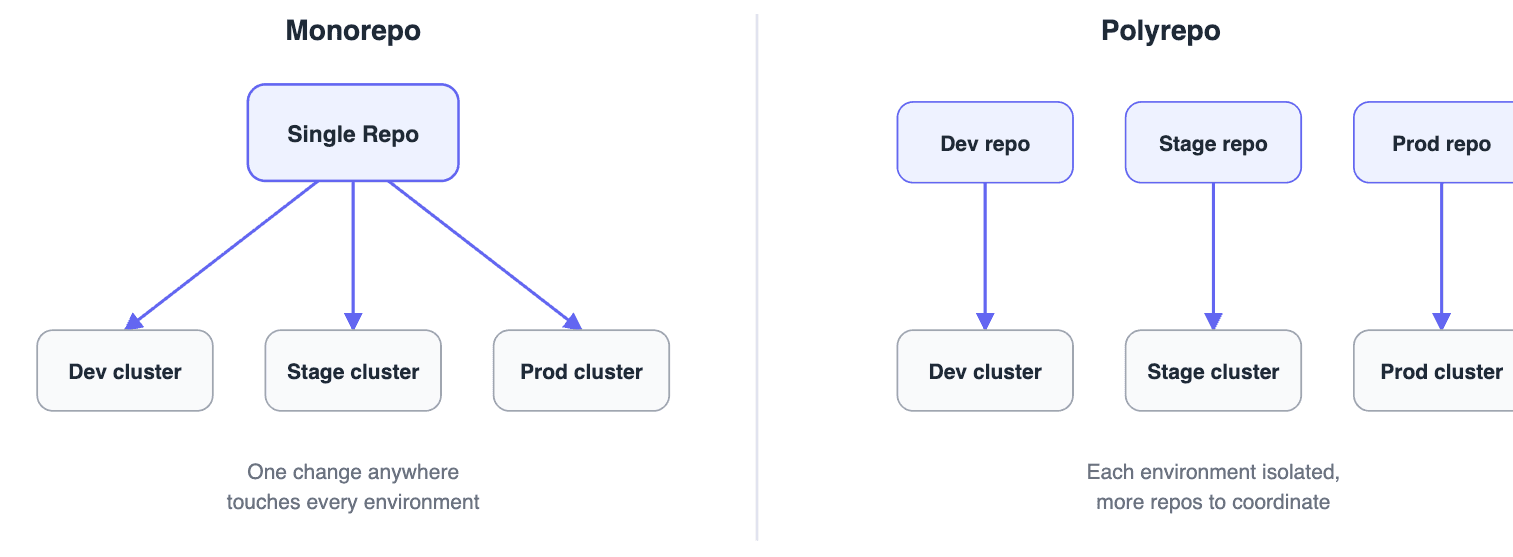
Monorepo or polyrepo is the other recurring question. A single repository centralizes changes and simplifies deployment, but at scale, a change anywhere in it can force every Argo CD instance watching it to re-render manifests, even for environments the change doesn't touch. Splitting configuration across multiple repositories, by application, environment, cluster, or team, avoids that blast radius at the cost of more repositories to coordinate. Most organizations land on a hybrid model, shaped by how the organization is structured.
4. CI/CD with GitOps: 3 Models for Integrating Pipelines
Continuous integration and continuous deployment aren't as tightly coupled as organizations traditionally assume. CI runs synchronously, triggered by a commit; GitOps runs asynchronously, with the controller acting only when the desired state in Git changes. Reconciling the two produces three common models:
Bolting on GitOps, where CI keeps managing deployment through floating tags. Fast to adopt, but floating tags undermine the core principle of Git as source of truth, since a forced tag update can change system state without the GitOps controller ever knowing.
Driven by CI, deployed by GitOps, where CI opens a pull request per stage and the GitOps controller handles the actual deployment.
Demarcation of tasks, the cleanest separation: CI builds, tests, and lints; the GitOps controller owns deployment and keeps the system in sync.
That third model is where Kargo fits in, moving promotion logic out of CI and making it declarative, auditable, and GitOps-native.
5. GitOps Environment Promotion with Kargo
GitOps establishes desired state in Git, continuous reconciliation, and a full audit trail. Continuous promotion is the next challenge: deciding when a change is ready to move to the next environment, what verification it needs, and who approves it. CI scripts or manual pull requests handle this for many teams, but standardizing promotion gets harder as more teams, services, and environments enter the picture.
Kargo, an open-source project from the creators of Argo CD, treats promotion as a first-class concern.
It's built around four concepts:
Warehouse: monitors upstream sources and emits new Freight whenever a revision changes
Freight: an immutable snapshot of artifact versions, such as an image SHA, chart version, or Git commit.
Stage: a promotion target (evaluation, staging, production, or any topology a team needs) that defines what Freight it accepts and what verification must pass before Freight moves downstream.
PromotionTask: a reusable promotion sequence teams can define once and share across Stages and projects.
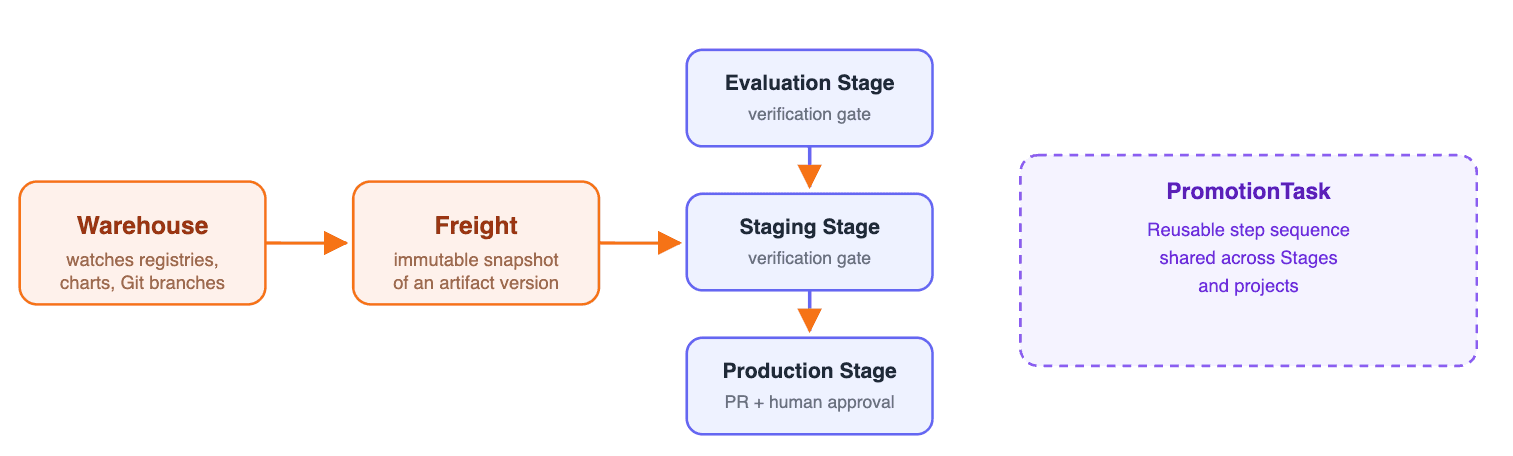
Figure: Kargo promotion model
Verification gates can check Prometheus metrics, HTTP health checks, or test results before Freight advances. For production, Kargo pairs well with the Rendered Manifests pattern below, opening a pull request against the production branch and waiting for it to merge before completing the promotion, giving teams a human approval gate without stepping outside the GitOps model.
Argo CD handles deployment: given a desired state in Git, it makes the cluster reflect it. Kargo handles promotion: given a new artifact, it moves that artifact through the right stages with the right verification and approvals. Deutsche Telekom runs both together to support GitOps operations at scale across hundreds of microservices.
For a deeper look at promotion strategies — including when to automate a stage versus gate it with human approval — see "Continuous Promotion with Kargo: A Complete Guide."
6. The Rendered Manifests Pattern
The desired state for a Kubernetes cluster is the manifests rendered by Helm or Kustomize, not the chart or Kustomization itself, though that's typically what organizations store in Git. Any abstraction between Git and kubectl introduces risk: a source of truth shouldn't get mutated right before application.
The Rendered Manifests pattern solves this by rendering manifests in CI and storing the output as-is in environment-specific branches. That eliminates tooling obfuscation, reduces risk with a genuinely immutable desired state, improves Argo CD performance, and allows different deployment policies per environment. The tradeoffs: added CI complexity, and incompatibility with tooling that renders plain-text secrets.
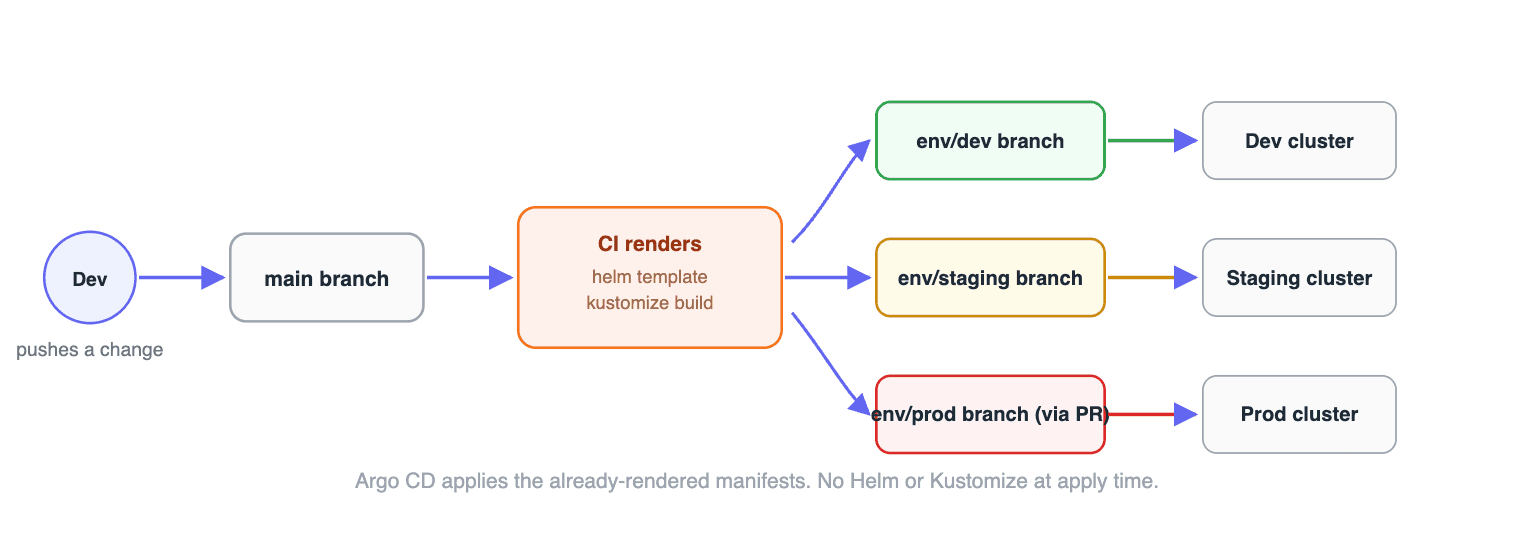
Figure: CI-Based Rendering - One of four approaches
Argo CD now supports this pattern natively through Source Hydrator, which separates the "dry" source from the hydrated manifests Argo CD applies, making hydration a first-class part of the Argo CD workflow instead of something every team has to build from scratch.
Kargo and OCI registries extend this further: Kargo can render and promote in a single pipeline, and OCI artifacts offer a content-addressed, signable alternative to Git branches for storing the hydrated output.
For the full breakdown, including all four implementation approaches (CI-based rendering, Source Hydrator, Kargo, and OCI Artifacts), see The Rendered Manifests Pattern: Why Your GitOps Repo Shouldn't Store Helm Charts or Kustomizations.
Get the Full GitOps Best Practices Whitepaper
Every practice above holds up in isolation. Where GitOps setups actually break down is in the details this post didn't have room for — the exact YAML, the real repo layout, the promotion pipeline that actually enforces the policy you meant to write.
That's what the whitepaper covers:
Working YAML for Kustomize and Helm, including when to reach for each
Reference directory layouts for monorepo, polyrepo, and hybrid setups
The full Kargo promotion model — Warehouse, Freight, Stage, and PromotionTask — with a working production workflow
A complete walkthrough of the Rendered Manifests pattern, including real before/after diffs showing what a one-line chart version bump actually changes in the cluster
How to set up Source Hydrator if you'd rather not build custom CI rendering from scratch
Download the 2026 GitOps Best Practices Whitepaper, written by the people who built and run Argo CD and Kargo in production.
Ready to Put These Practices Into Production?
Deploy, promote, and operate applications reliably, powered by OSS you trust and Intelligence you control. That means Argo CD and Kargo at the core, plus multi-cluster management, DORA metrics, and audit logs on top — managed and supported by the team that built both tools.
Frequently Asked Questions
Should I use Kustomize or Helm?
Most teams use both. Kustomize is best for patching values you already know ahead of time; Helm is best for parameterizing values you won't know until deploy time, like an Ingress hostname that varies by cluster.
What does Kargo do that Argo CD doesn't?
Argo CD reconciles a single environment to match its desired state in Git. Kargo governs how a verified artifact moves between environments — dev to staging to production — with verification gates and approvals along the way.
What is the Rendered Manifests pattern?
It's the practice of rendering Helm or Kustomize output before it reaches the cluster and storing that final YAML in Git (or an OCI registry) as the actual desired state, instead of letting Argo CD render the chart or overlay at sync time.
