Automated rollbacks in Kargo Enterprise
Irina Belova, Carolyn King

TL;DR Kargo Enterprise 1.11 adds automated rollback: when a stage fails verification, Kargo re-promotes the last verified Freight through the standard promotion path, no human required. That cuts mean time to recovery (MTTR). Open source Kargo covers the promotion model and manual recovery; automated rollback ships in Enterprise.
The recovery gap in software delivery
Most teams handle a bad release one of three ways: a person watches dashboards and promotes the fix by hand, a homegrown script watches the pipeline and reacts, or nothing watches at all until a customer notices. Argo Rollouts can catch a bad image at the workload level, but configuration and non-Kubernetes targets are left as-is. None of these close the gap between detection and recovery at the environment level.
Kargo made promotion a first-class GitOps object, but recovery has stayed manual. Open source Kargo detects a failed verification instantly. Everything after detection (paging a person, opening the UI, finding the right Freight, clicking promote) still depends on a human being available and fast.
As pipelines add stages and promotion frequency increases, that gap between detection and recovery is where mean time to recovery (MTTR) climbs, SLAs get missed, and on-call load grows. Kargo Enterprise 1.11 closes it: when a stage fails verification, Kargo re-promotes the last verified Freight on its own, through the same Promotion path used for every release. Recovery moves from something a person does to something the pipeline does.
What is continuous promotion?
New to Kargo? Here's the short version (skip ahead if not)
GitOps solved deployment by reconciling clusters to the state declared in Git. Continous promotion is the separate process of moving a verified change through development, staging, and production. Most teams still handle promotion with manual steps, custom scripts, or a partial fix like Argo Rollouts catching a bad image while leaving the rest of the environment untouched.
Kargo, built by the Akuity team behind Argo CD, treats promotion as a first-class GitOps object: Freight moving through Stages, audited the same way as deployment. For the full picture on how Kargo approaches promotion, see Continuous Promotion with Kargo: A Guide for Platform Teams.
How recovery works in open source Kargo without automated rollbacks
Open source Kargo runs promotion as a GitOps pipeline: a Warehouse detects new artifacts and produces Freight, and Stages promote that Freight through environments, with verification catching a bad release before it moves forward. Rolling back is just promoting the last verified Freight again, following the same policies and landing in the same history.
Three practical paths cover recovery today:
Re-promote the last verified Freight manually, in the UI or CLI.
Abort a stuck or in-flight promotion, then promote the correct Freight.
Script recovery against the Kargo and Argo CD APIs, for example from a GitHub Actions job watching for a failed verification.
All three depend on a person, or on tooling that has to be built and maintained. The capability is there; the automation has been the missing piece.
Note: Automated rollback, the subject of this announcement, is available only in Kargo Enterprise, not in open source Kargo.
How automated rollback works in Kargo Enterprise
Kargo Enterprise 1.11 turns that manual step into a policy. Automated rollback tells a Stage what to do when its own verification fails: re-promote the last known-good Freight, automatically.
A few ways it shows up in practice:
A staging deploy fails its analysis run at 2am. Kargo re-promotes the last verified Freight before anyone gets paged. By morning, the stage is already recovered and the failed run sits in the promotion history for review.

A bad ConfigMap breaks a pre-prod environment in a way an image-only rollback would not catch. Kargo reverts the full stage, configuration included, back to the last verified state.
A promotion to a Terraform-managed target errors out mid-run. The onPromotion: Failure trigger fires, and Kargo re-promotes the last verified Freight to that target the same way it would for a Kubernetes stage.
A platform team turns rollback on for staging and every pre-prod environment, but leaves production on a manual gate, by scoping the policy to specific stages through stageSelector.
Underneath, it works through a ProjectConfig promotion policy: a stage is selected, trigger conditions are set (failed verification, errored verification, failed promotion), and Kargo watches for those conditions and re-promotes the last verified Freight through the same Promotion path used for every release. No separate rollback mechanism, no new object type to learn.
What teams gain from automated rollback
The mechanism is simple by design; what it changes for a team running it day to day is where the real impact shows up.
Recover in seconds. Rollback starts the instant a verification fails, so MTTR drops close to zero, cutting into the downtime that leads to missed SLAs and lost revenue.
Ship faster, with less fear. When a bad release recovers on its own, teams can deploy more often and closer to deadlines, without padding every release with manual safety checks. Features and fixes reach customers sooner.
Recover the whole environment, not just the image. Because rollback reverts configuration and non-Kubernetes targets alongside the image, a stage returns to a known-good state rather than a half-recovered one.
Keep the audit trail. Every rollback runs through the standard, audited promotion path, so recovery stays as traceable and governed as any other release.
Retire brittle tooling. Automatic recovery takes over the job that homegrown scripts have been doing, removing a source of drift and on-call toil in the process.
The bottom line: releases ship faster, customers onboard sooner, and less revenue is lost to downtime along the way.
Automated rollback feature overview
Automated rollback covers the full promotion path, not just the trigger. Configuration lives in a per-stage policy, and the behavior spans detection, scope, and governance.
Trigger conditions
Failed verification (the primary trigger; a stage's analysis run reports failure)
Errored verification (the analysis run itself fails to complete)
Failed promotion (the promotion mechanics fail, independent of verification)
Configurable per stage through autoRollback.onVerification and autoRollback.onPromotion in the ProjectConfig policy
Recovery scope
Reverts the full stage state: image, configuration, and non-Kubernetes targets together, not the image alone
Applies to any promotion target Kargo Enterprise supports, including Terraform and VM stages alongside Kubernetes
Uses the same last-verified-Freight logic available in open source Kargo's manual recovery path, automated rather than triggered by hand
Governance and audit
Runs through the standard Promotion mechanism; a rollback produces the same audit record as any forward promotion
No separate rollback engine or code path to reason about or secure independently
Per-stage enablement, so production can stay on a manual gate while staging or pre-prod self-heals
Configuration
Enabled through a ProjectConfig promotion policy scoped to one or more stages by stageSelector
Coexists with Argo Rollouts; teams commonly run Rollouts for in-cluster progressive delivery and Kargo automated rollback for stage-level recovery across the broader pipeline
Kargo Enterprise automated rollback vs Argo Rollouts
Argo Rollouts also does automated rollback, but at a different layer, and the two are complementary rather than competing. Teams already running Argo Rollouts for in-cluster progressive delivery can now add Kargo Enterprise for stage-level recovery across the pipeline.
Argo Rollouts works at the workload level, driving progressive delivery for a single Kubernetes Deployment or Rollout and reverting the container image when analysis fails. It requires each application to be built for it, is Kubernetes-only, and reverts the image alone, leaving networking, ConfigMaps, and other surrounding configuration as-is, so the environment can still be broken after the image rolls back.
Kargo Enterprise's automated rollback works at the promotion level: when a stage fails verification, Kargo Enterprise re-promotes the last verified Freight for the whole stage, configuration and non-Kubernetes targets included, not just the image. Platform teams enable it by policy on the stages they choose, with no manifest changes required from application teams.
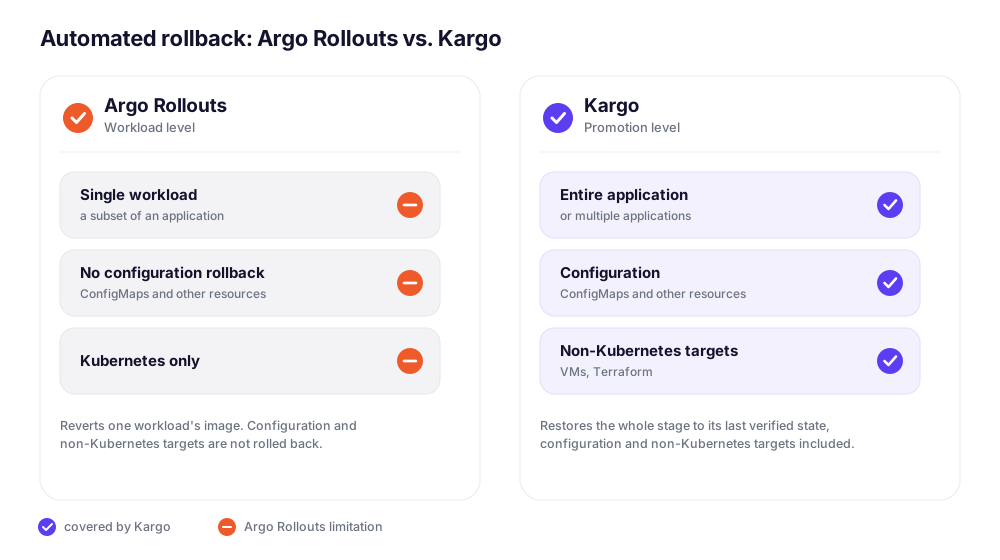
Where automated rollback fits in a pipeline
Teams turn it on for stages where a failure shouldn't wait for a human, keeping production on a manual gate where one is wanted.
Specific cases where teams reach for it:
A staging or pre-prod stage where a failed verification should self-heal, keeping the pipeline moving without an on-call page.
High cost-of-failure environments like payments, checkout, or booking, where a few seconds of a bad release means lost revenue or a missed SLA.
Config-driven failures, where a bad ConfigMap or networking change breaks an environment that an image-only rollback would not fix.
Teams replacing homegrown rollback scripts move that logic out of GitHub Actions and into the promotion system itself, so it stops drifting from the pipeline it protects.
Getting started
Prerequisites
Kargo Enterprise 1.11 or later
At least one Stage with a verification step already configured (automated rollback triggers off verification results, so a stage without verification has nothing to trigger on)
Configuration example:
Configuration, conditions, and per-stage examples beyond this are in the documentation: Automated rollbacks docs.
Join the webinar or request a demo
Webinar with live Q&A
Walk through automated rollbacks in Kargo, including a live demo, with Jesse Suen, co-creator of Argo CD and Kargo. Registrants who can't attend live will receive the recording. Save your seat.
Talk through your setup
For teams running homegrown rollback scripts or scaling Kargo across many stages: Schedule a call to discuss how automated rollback fits a specific pipeline, including whether Enterprise is the right fit.
Read the Automated rollbacks docs
Learn more about Kargo Enterprise
Automated rollback is one of several Enterprise capabilities for teams running promotion at scale. For more on the broader platform:
Automated rollback docs — configuration, conditions, and per-stage examples
Promotion to Terraform and VM targets — extending the same promotion model beyond Kubernetes
Custom steps — packaging security scans, compliance checks, or internal system calls into the promotion pipeline
Kargo Enterprise overview — SSO, RBAC, and support details
FAQs
Does automated rollback work with existing verification analysis templates?
Yes. Automated rollback triggers off the verification result a stage already produces. No changes to existing analysis templates are required.
What happens if the last verified Freight is also bad?
Kargo re-promotes the most recent Freight that passed verification, not simply the previous one. If that Freight is itself broken, rollback restores a broken state, so verification coverage on each promotion matters more once rollback is automated.
Can this run alongside Argo Rollouts?
Yes. Argo Rollouts reverts a container image at the workload level inside a single application. Kargo automated rollback reverts the full stage, including image, configuration, and non-Kubernetes targets, at the promotion level. Teams commonly run both together.
Does this require changes to open source Kargo manifests?
No. The autoRollback field is already part of the open source ProjectConfig CRD. Enabling it requires Kargo Enterprise, since the controller that acts on the field ships there, but no manifest migration is needed moving from OSS to Enterprise.
