Fleet Management: A Guide for Platform Teams
SHARE ARTICLE


Fleet management is the practice of moving software changes across a fleet of deployment targets, such as Kubernetes clusters, GPU nodes, and edge devices, as one release, with rollouts that are gated, verified, and reversible. As production grows from a few clusters to hundreds of clusters, GPU nodes, and edge sites, the hard part is no longer deploying a change but moving it safely across every target: in the right order, with verification at each step, and with a way to undo it as one operation. This guide is for platform engineers, SREs, and infrastructure leads who ship changes to dozens, hundreds, or thousands of targets.
What Is Fleet Management?
Fleet management is the practice of moving software changes across hundreds or thousands of deployment targets, such as Kubernetes clusters, GPU nodes, and edge devices, as one release, with rollouts that are gated, verified, and reversible. A change moves through the fleet in ordered waves, each target reports its own health, and the rollout stops when failures cross a set threshold.
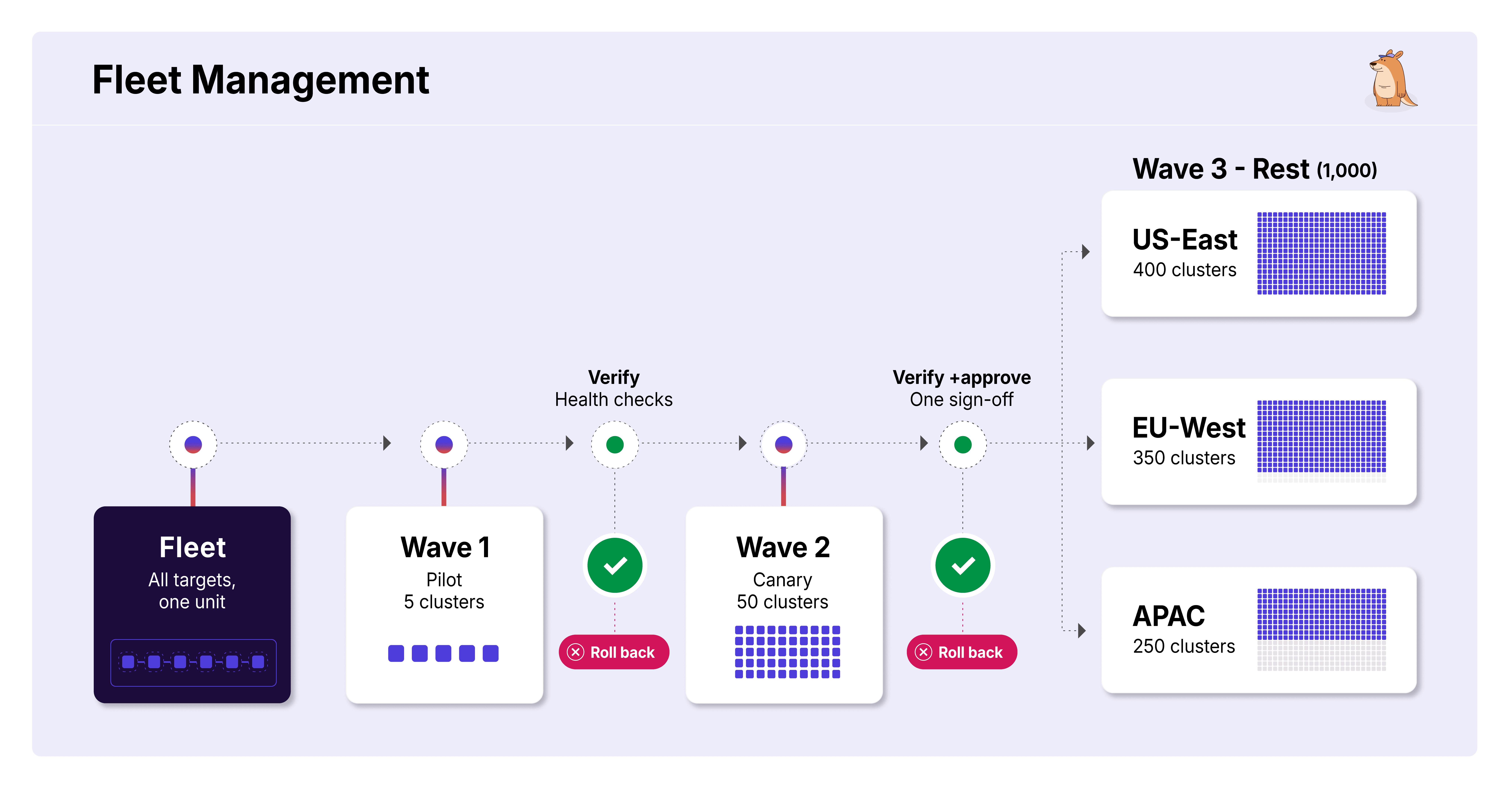
Fleet management covers how a change travels across existing infrastructure; creating, upgrading, and configuring that infrastructure is a separate job. Most teams first meet the problem on Kubernetes, which is why the practice is often called Kubernetes fleet management. The targets don't have to be Kubernetes clusters, though. The same model applies to GPU nodes, VMs, bare-metal servers, and edge devices that never touch a Kubernetes API, which is why the practice is fleet management rather than cluster management.
To learn how cluster management is different from fleet management, read The Fleet Management Gap: What Existing Kubernetes Tools Solve, and What They Don't
What Are the Core Concepts of Fleet Management?
These terms come up in every fleet rollout, whatever the targets are.
Fleet: A set of deployment targets expected to converge on the same state, whether 12 Kubernetes clusters, 1,000 edge devices, or 12,000 bare-metal GPU nodes.
Target: One member of the fleet, such as a cluster, node, or device, tracked with its own health so a rollout knows where it is failing.
Partition: A deliberate subdivision of the fleet, grouped by region, customer tier, or hardware generation, so rollouts can be targeted instead of all-or-nothing.
Wave: An ordered step in a rollout, gated by the success of the step before it. Wave 1 might cover three canary clusters, wave 2 the next 20% of the fleet, and wave 3 the remainder.
Blast radius: The maximum number of targets a single failed wave can affect before the rollout halts, defined before the rollout rather than after an incident.
Soak time: How long a wave must run cleanly before the next wave starts, from minutes for lightweight add-ons to hours or days for core data-path components.
Failure threshold: The share of targets that can fail across a rollout before it stops. Below the threshold, isolated failures, such as an unreachable cluster, stay visible without halting the rollout. Above it, the rollout stops. Some teams call this a failure budget.
Why Are Platform Teams Moving to Fleet Scale?
Generative AI has sped up code generation, which moves the bottleneck to delivery. Faster feature work adds little if changes stall on the way to production. Delivery tooling has advanced in layers: Argo CD automated deployment to a cluster, and Kargo automated promotion across environments. The open problem now sits one layer up: rolling a promoted change out across hundreds of clusters, GPU nodes, and edge devices. That layer is fleet management.
Spectro Cloud's State of Production Kubernetes 2025 report found that enterprises already run more than 20 clusters and more than 1,000 nodes across five or more clouds and environments, and that half of Kubernetes adopters now run production Kubernetes at the edge, much of it for AI workloads. Individual fleets go much further. Mercedes-Benz grew from 200 to roughly 1,000 clusters, and Chick-fil-A runs an edge cluster in each of its roughly 2,800 restaurants. At that scale, the cluster stops being the useful unit of operation.
Read The Fleet Is the New Cluster to learn more about the five forces driving fleet scale: AI and GPU infrastructure, multi-cloud, dedicated SaaS environments, edge deployment, and regulated industries.
Where Fleet Rollouts Break Today
In each scenario below, the change itself is routine. Moving it safely through hundreds or thousands of targets is the hard part.
Security patches on shared clusters: A version bump reaches every cluster at once, with no pilot group or health check, so a bad update surfaces days later.
Dedicated customer clusters: Teams choose between releasing to every customer at once and maintaining a separate pipeline per app per cluster.
Stores and edge sites: Rollout order lives in a spreadsheet that drifts as sites open and close, and an engineer watches each batch by hand.
Regulated environments: Approvals run once per cluster, or the team can't prove which clusters received a change and who approved it.
GPU drivers and firmware: A faulty driver can interrupt training jobs and take bare-metal nodes out of service across thousands of machines.
Read Fleet Management In Practice: Four Real-World Use Cases to learn more about how platform teams handle the first four scenarios today.
How Fleet Management Differs from Existing Kubernetes Tools
Most Kubernetes tools manage clusters rather than the rollouts that run across them. Provisioning platforms such as Cluster API, Spectro Cloud, and Rafay create, upgrade, and retire clusters. Delivery tools such as Argo CD ApplicationSets and Rancher Fleet fan manifests out to many clusters. Multi-cluster layers such as Open Cluster Management and Karmada present many clusters as one API for placement and scheduling. All three are forms of cluster management.

ApplicationSets and Rancher Fleet come closest. Both can stage a rollout in batches, ApplicationSets through Progressive Syncs (a beta feature, disabled by default) and Rancher Fleet through its rolloutStrategy settings. Neither stops a rollout when failures across the fleet cross a threshold, rolls the fleet back as one operation, or shows an in-flight rollout as a whole. That progression layer is fleet management.
Read Part 2 of this series, The Fleet Management Gap: What Existing Kubernetes Tools Solve, and What They Don't, to learn more about each tool category, including a capability-by-capability comparison of ApplicationSets and Rancher Fleet.
Why Homegrown Rollout Scripts Break at Fleet Scale
In the 2026 Argo CD user survey, 62% of respondents at large companies promote changes between environments with custom CI scripts. Those scripts usually start as a pipeline hook that pauses between waves and grow into an in-house control plane built from three parts:
An iterative CI pipeline: A job loops over a target list, usually a YAML file and occasionally an exported spreadsheet, calling kubectl apply or helm upgrade per cluster.
A forked "golden" deploy script: One engineer's weekend fix that is now load-bearing infrastructure nobody wants to touch.
Slack as the system of record: A channel serves as the deployment log ("rolling out v2.3 to region-west now, will update") because nothing else records what shipped where and when.
Plenty of teams run this setup successfully while the fleet is small. The failures below surface once the fleet grows past what one on-call engineer can track.
Where It Breaks
Fragmented visibility: Answering what runs where means grepping CI logs or scrolling Slack history, because the source of truth is spread across systems that don't talk to each other.
Fragile recovery: Undoing a bad change means running the script backwards and hoping the target list hasn't drifted, or reconstructing by hand which clusters got the bad version.
Manual wave gating: Someone hand-edits the target list between waves, commenting lines out, remembering to uncomment them, and hoping the diff is right.
Audit gaps: Six months later, nobody can reconstruct who approved a change for a given partition, because approval was a thumbs-up emoji in a thread that has scrolled off.
Logic drift: Every edge case, custom flag, or delayed customer wave becomes an inline if statement, until the script holds more branching logic than rollout logic.
What Are Fleet Management Best Practices?
These six practices follow the life of a rollout: defining the fleet, moving a change through it, deciding when to stop, recovering, and keeping a record. They apply whatever tooling runs the rollout.
1. Define the Fleet and Scope Ownership
Replace tribal knowledge with a queryable inventory of the full fleet, sourced from an existing system of record such as Argo CD or a cloud inventory, so new clusters, stores, and customer environments join rollouts without anyone editing a target list. Partition by geography, tenant tier, or compliance requirement, and set ownership boundaries: platform teams govern baseline add-ons across the fleet, and application teams own their workloads. Codified partitions and ownership keep access control enforceable and rollout targets predictable as the fleet grows.
2. Roll Out Changes in Ordered Waves
Move changes through risk-weighted waves, from internal canaries to general availability to high-SLA enterprise targets, instead of arbitrary loops over clusters. Rollout order should be deterministic, so an interrupted rollout can resume where it stopped without guessing which targets already converged. Operators should also be able to pause and resume a rollout, and skip targets in a maintenance window to return to later.
3. Verify Health at Every Target
A fleet orchestrator shouldn't prescribe a single definition of health. Each target should pass its own verification gate before the rollout advances. Successful delivery doesn't prove runtime health, so verification should use workload-aware signals such as error rates, latency, APM data, and smoke tests. A GPU driver and a NetworkPolicy fail in different ways, so the verification framework needs to be pluggable.
4. Enforce a Fleet-Wide Failure Threshold
Track failures across the whole rollout, not only per cluster. Cluster-level checks confirm that local pods or API servers are up, but miss degradation spreading across environments. The orchestrator should halt the rollout automatically once failures cross the threshold, containing regressions before they spread. Below the threshold, isolated failures, such as an unreachable cluster or a store that loses connectivity, stay visible to operators without stopping the rollout.
5. Roll Back the Fleet as One Operation
Make rollback a first-class operation rather than an ad hoc fire drill. When a release fails verification or crosses its failure threshold, the system should halt progression and roll back across the fleet as one coordinated operation, as deliberate and observable as rolling forward, with a record of which targets received the change and which need recovery.
6. Govern Rollouts at the Fleet Level
Per-cluster permissions can't control who approves a change into sensitive customer tiers or who can roll back the fleet. Scope RBAC to the teams that own each part of the fleet, run approval once per rollout and its scope rather than once per cluster, and keep one record of which artifact shipped, who approved each wave, and when each target converged. That record replaces stitching together siloed cluster data during an incident or an audit.
Existing tools cover the first two practices in part. ApplicationSet generators can discover clusters, and Progressive Syncs and Rancher Fleet can stage batches. Teams often fall back on scripts for the other four: per-target verification, a fleet-wide failure threshold, rollback across the fleet, and governance that runs once per rollout.
How Does Kargo Enterprise Extend Promotion Across a Fleet?
Argo CD deploys to each cluster. Kargo decides what gets deployed where. It promotes Freight, a versioned bundle of images, manifests, and charts, from one Stage to the next (development, staging, production), with verification at each step. That model works well when each environment is a handful of targets.

It strains when one environment holds hundreds. Modeling each application on each cluster as its own Stage multiplies into thousands of Stages, and collapsing targets into one Stage gives up per-target status and verification.
Fleet Management in Kargo Enterprise extends promotion from environments to the targets inside them. Platform teams group targets into a fleet, set the rollout order and failure threshold once, and Kargo promotes each change through the fleet wave by wave. Fleet Management was announced in October 2026, with a private beta open ahead of its planned release in Kargo 2.0.
Best practice | How Kargo Fleet Management Handles It |
|---|---|
Define the fleet | Deployment targets are grouped into a fleet, with membership drawn from Argo CD or a cloud inventory. |
Ordered waves | Partitions run in order, from pilot to canary to the general population |
Verify every target | Each target passes Kargo verification before the next wave starts |
Fleet-wide failure threshold | The rollout succeeds or stops against a percentage-of-fleet threshold |
Roll back as one operation | Designed to work with Kargo's automated rollback, returning updated targets to the last good version |
Govern at the fleet level | Approvals and notifications run once per rollout; RBAC stays at the project and Stage level |

The Fleet Is the New Cluster: The Infrastructure Shift Platform Engineers Can't Ignore

The Fleet Management Gap: What Existing Kubernetes Tools Solve, and What They Don't
