Kargo Enterprise 1.12: Promotion windows, approvals, and audit events
Irina Belova


Kargo Enterprise 1.12 adds promotion windows, approval steps, and custom audit events. You can restrict production promotions to a release schedule, pause a pipeline for a reviewer, and record the decision in Akuity’s central audit log.
Release freezes, sign-off, and change-request records often sit outside the deployment pipeline. Kargo 1.12 brings them into the promotion workflow, so teams can define when a change may proceed, who needs to review it, and what to record.
The release also adds a Guided Project Creation Wizard, clearer step output, and improvements to artifact discovery and promotion steps. These changes are available in both open source Kargo and Kargo Enterprise. Promotion Window enforcement, approval steps, and custom audit events require Enterprise.
Promotion Windows: set a release schedule
Kargo Enterprise
Promotion Windows lets you define when a Stage may accept a promotion. An allow window limits promotions to the times you specify, such as weekdays from 9 a.m. to 5 p.m. A deny window blocks them during a freeze, such as a holiday sales event.
You can define windows for a project or use cluster-level configuration to apply them across projects. Stage labels control which environments a window matches. For example, a production freeze can apply to Stages labeled environment=production while development and staging remain available.
Schedules use RRULE recurrence and an explicit time zone. A weekday schedule in America/New_York follows local time through daylight-saving changes. You do not need to adjust the schedule’s UTC offset by hand.
The UI shows when promotions are blocked and which window is responsible. The calendar makes it easier to see how normal release hours and a temporary freeze fit together. Kargo evaluates each Stage against the windows that apply to it.
Promotion Windows apply to automatic promotions and automatic rollbacks. During a freeze, Kargo can block an automated rollback to a previous release as well as a new promotion.

A temporary freeze blocks promotions from 15:00 to 16:45, even within the allowed release window. Promotions can resume for the final 15 minutes before the window closes.
Approval Policies: pause a promotion for review
Kargo Enterprise
The wait-for-approval step pauses a promotion until the required reviewers approve it in the Kargo UI. You choose who may respond using an SSO group, an email claim, or a Kargo role.
Place the step before the change you want reviewed. An infrastructure pipeline can generate a plan, wait for approval, and then apply it. An application pipeline can wait before publishing the production configuration.
Approval requirements are part of the pipeline configuration:
steps: - uses: wait-for-approval as: production-review config: minApprovals: 1 approvers: - claim: groups value: production-reviewers
The minApprovals setting controls how many distinct reviewers must approve. While the step waits, the promotion remains in the running state. A rejection from an eligible reviewer fails the step and the promotion. Each response records the reviewer, action, timestamp, and optional reason. The approval step reference covers the available configuration options.
Approval steps can also use conditional logic. You can require them only for production or select different approvers for a hotfix. If your rollback workflow skips an approval, its Promotion Window restrictions still apply.

This production promotion is waiting for one reviewer. Eligible reviewers can approve or reject it directly in Kargo and include an optional reason.
Custom Audit Events: record release details and decisions
Kargo Enterprise
Teams often need more than a deployment status in the release record. They may need a release-note ID, a change-request number, or a reviewer’s explanation. In 1.12, a promotion can collect those details and write them to the central audit log.
The record-audit-event step lets a promotion publish a custom message to Akuity’s central audit log, with an action type, actor, and additional data. The event also appears in the project’s Events tab. Use it to record a release milestone or the outcome of an approval. See the audit-event step reference.
For details supplied by a person, combine it with get-user-input. This step presents a form defined with JSON Schema, validates the submission, and makes the values available to later steps. A form can collect a release-note ID and a comment explaining the change; a following record-audit-event step can include both in the audit log. See the user-input step reference.
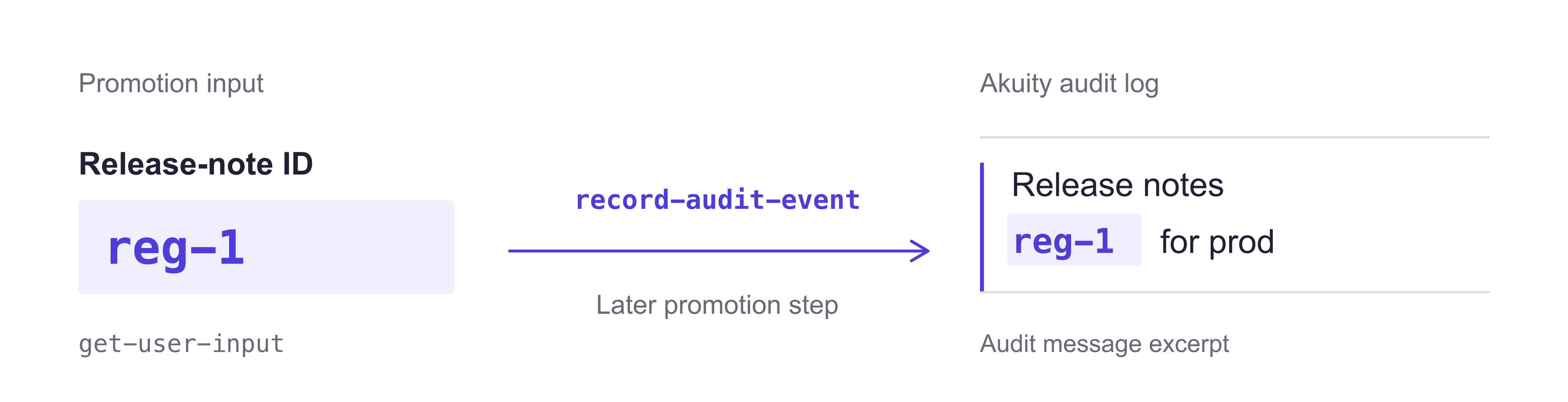
A later record-audit-event step can include a release-note ID collected by get-user-input in a custom message in Akuity’s audit log.
Custom entries can be exported with the central audit log, and Kargo’s event routing can send relevant events to Slack or email. Version 1.12 also records aborted and window-blocked promotions, so the log includes attempts that did not proceed.
Guided Project Creation: set up a pipeline from the UI
Open source Kargo and Kargo Enterprise
The Guided Project Creation Wizard lets you set up a pipeline without writing the initial YAML by hand. It walks through the Project, credentials where needed, Warehouses, Stages, and promotion policies.
Previously, setting up a project meant creating those resources separately and understanding how to connect them. The wizard puts them in one flow, with a review step before creation and a live YAML preview as you configure the resources.
In the Stages and pipeline step, you can add Stages yourself or load the example dev, staging, prod chain. Configure the promotion policies, review the resources, and create the project.
Other changes in 1.12
Kargo 1.12 also improves day-to-day pipeline work:
Readable step output. The output panel is expandable and scrollable, giving reviewers room to inspect a plan or script log before approving a change.
Per-step timing. The promotion view shows how long each completed step took and a live duration for the running step. You can see which operation is taking time without opening a terminal.
Repository credentials in expressions. The repoCredentials(repoURL, type) function lets a promotion step reuse Kargo’s configured credentials for a Git, Helm, or image repository. It returns resolved credentials, including short-lived tokens such as GitHub App installation tokens. For example, an http step can use the resolved token to call a repository provider’s API without maintaining a separate personal access token.
HTTP request bodies from files. The http step’s new bodyFromFile option reads the request body from a file in the promotion work directory. A pipeline can generate a payload in one step and send it in the next, without embedding the payload in an expression. See the HTTP step reference.
Named Subscriptions. Give a Warehouse source a readable name such as frontend or api, so similar repository URLs are easier to distinguish in the UI.
Argo CD links. Links from a Stage to its Argo CD applications use what the promotion actually resolved, making them more reliable across different pipeline structures.
File packaging. The new tar step archives a file or directory, so a pipeline can package generated output before uploading it to an external endpoint.
Cross-account ECR discovery. Kargo can discover images in an ECR registry in another AWS account using role assumption. This supports a central registry account serving separate workload accounts without long-lived AWS keys for discovery.
Dark theme. Dark mode now covers the core UI and extensions.
Availability
Kargo Enterprise includes the open source features below and adds the production governance controls.
Capability introduced or improved in 1.12 | Open source | Enterprise |
|---|---|---|
Promotion Window evaluation and enforcement | — | Yes |
Approval Policies and interactive approval steps | — | Yes |
Custom audit events in Akuity’s central audit log | — | Yes |
Guided Project Creation Wizard | Yes | Yes |
Named Subscriptions, dark theme, Argo CD links, and step timing | Yes | Yes |
tar, HTTP request bodies from files, and cross-account ECR discovery | Yes | Yes |
Upgrading to 1.12
Before upgrading, check integrations and promotion templates for these compatibility changes:
API integrations. The deprecated ConnectRPC-based API has been removed. Migrate integrations to the REST API and upgrade the Kargo CLI alongside the backend.
Pull request creation. The git-open-pr step no longer supports createTargetBranch. The target branch must already exist on the remote.
Stage health output. The Argo CD Application statuses in status.health.output.applicationStatuses no longer include reconciledAt or condition lastTransitionTime values. Update any integrations that read those timestamps.
Review the Kargo 1.12 release notes and the deprecations and breaking changes guide for upgrade details.
If you are new to Kargo, start with the project wizard. For an existing Enterprise pipeline, try a promotion window and an approval step in a test Stage before applying them to production.
Explore Kargo Enterprise or request a demo to see how these features fit your release workflow.
