What’s New in Kargo v1.6
Anjelica Ambrosio

Kargo 1.6 is here! The latest Kargo release hooks you up with long-awaited webhook support, giving your GitOps pipeline the power to react instantly to code and image changes. The introduction of webhook support means you can say farewell to waiting and checking for updates; say hello to faster, more efficient deployments with less overhead. Alongside this game-changing feature, we’ve incorporated a set of thoughtful UI improvements, smarter filtering, and user-friendly enhancements to ensure promotion remains smooth, responsive, and efficient.
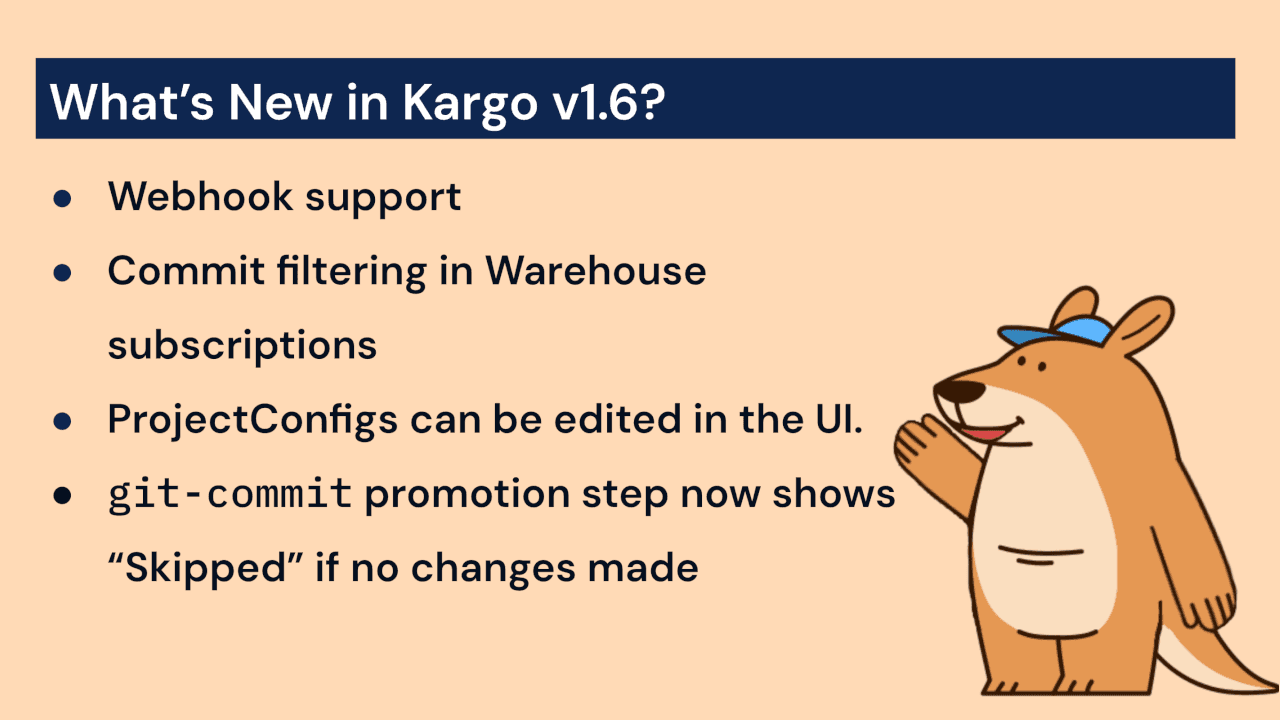
Here’s a quick rundown of the updates 1.6 brings:
Webhook Support
New UI option to manually “pull” freight from a single upstream stage
You can now edit
ProjectConfigsandClusterConfigsfrom the UI.Commit filtering in Warehouse subscriptions.
The
git-commitpromotion step will now complete with a 'Skipped' status instead of 'Succeeded' if it detects that there are no diffs in the working tree.
Before we unpack these exciting new features and updates, let’s review.
What is Kargo?
Kargo is a multi-stage GitOps continuous promotion tool and application lifecycle orchestration platform developed by the creators of the Argo project.
Continuous Promotion is a GitOps-driven approach that automatically moves application versions or configurations across environments (e.g., from development to production). For example, moving code from a development stage to the production stage would be referred to as “promoting to prod.” Promotions are based on predefined rules or conditions, eliminating the need for manual intervention.
In a world without continuous promotion tools such as Kargo, developers would need to manually promote code from one stage to another throughout the development process. Manually promoting code across environments often involves tedious tasks such as: managing approvals, installing and implementing scripts, and merging branches – all prone to human error.
By comparison, Kargo automatically carries out the steps for promotion when certain conditions (such as if/else statements and waiting for an event to finish successfully) are met. For example, when a new app version is deployed to dev and passes tests, Kargo automatically promotes it to staging using the same image. If the app passes tests and checks in the staging state, then Kargo promotes it to production—no manual steps required. The result? Faster, safer, and more consistent app releases.
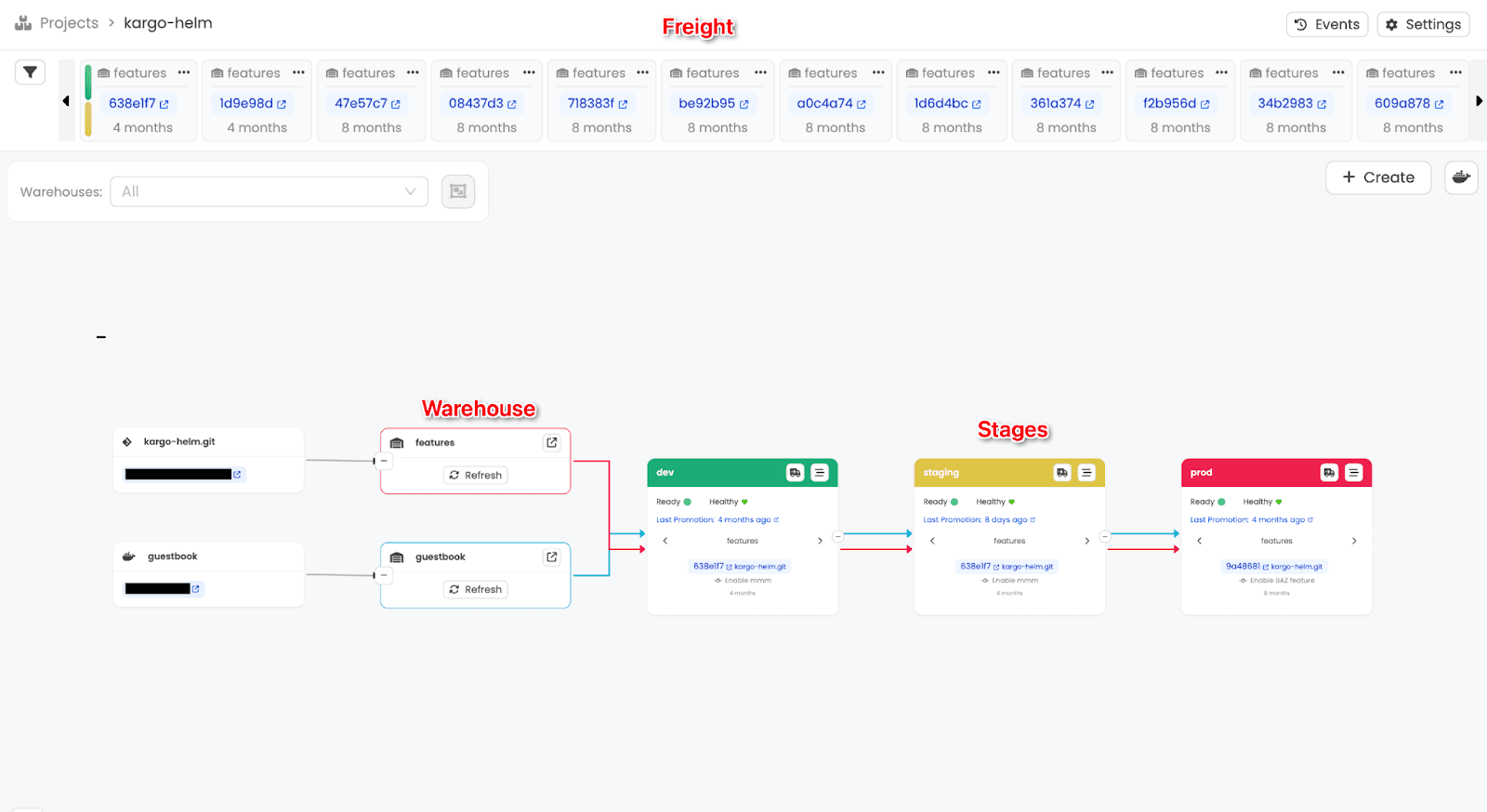
The example above shows the pipeline view in Kargo. Note the colored tabs – we refer to these as stages, or environments. The artifacts, or freight, are represented at the top. Freight is retrieved from warehouses (e.g., Git repositories).
Kargo’s Key Advantages
Kargo’s method of code promotion can provide many benefits for DevOps teams, such as:
Faster Software Delivery
Allows quick progression once the code passes checks and is ready and stable.
Lower Operational Overhead
Eliminates manual promotion tasks (such as creating pull requests for staging)
Improved Consistency
Reduces the risk of skipping promotion steps or deploying incorrect versions.
Better Feedback Loops
Teams see their changes progress through environments automatically.
Auditability and Traceability
Since promotions happen via Git, every step is tracked, reviewed, and reversible.
Catch the Wave: Kargo’s Anchor Feature Supports Webhooks
One of the most exciting upgrades in Kargo 1.6? It’s now fully hooked up with new Webhook support for real-time updates.
When Kargo was first created nearly three years ago, it depended entirely on webhooks, which are messages or alerts that new versions of code or container images are available. You can receive these messages from services like GitHub or Docker Hub. However, as many developers are aware, webhooks aren’t always reliable. If the server is down when a webhook is sent, that notification is as good as gone.
To avoid missing critical updates, we later switched to a method called discovery, which involves Kargo regularly checking (or "polling") for new versions. Although discovery can be a much more reliable approach compared to webhooks, it is also less efficient.
Even with aggressive caching on the Kargo side, OCI registries (used for images or Helm charts) exhibit unusual behavior that can cause discovery to send requests repeatedly. Kargo can only run a limited number of these checks simultaneously, and many OCI registries restrict the frequency of access. As a result, the system-wide performance of warehouses (e.g., git repositories, where artifacts such as images are retrieved) can be relatively slow. Warehouses look for new artifacts in Kargo every five minutes by default. However, slow performance can significantly delay Kargo’s awareness of new updates.
The ideal solution to this dilemma is to have scheduled checks occur less frequently to conserve performance, while still receiving immediate notifications whenever new updates become available. Since strictly relying on notifications isn’t a reliable solution, Kargo 1.6 brings a powerful new feature that balances both: the anchor feature. The anchor feature introduces robust webhook support, aiming to deliver notifications in a smooth and efficient manner.
Limitations of the Anchor Feature (and What’s Ahead)
However, please note that the anchor feature is currently in beta. While the anchor feature works, you may experience some quirks. For example, if the warehouse is set to watch the main branch of a Git repository, it will still react to pushes on other branches, such as feature branches or stage-specific ones.
The same applies for container images: even if a warehouse only cares about versioned tags, it will still trigger discovery when a tag such as ‘latest’ is pushed. This means that, depending on the activity in the repositories, this may end up triggering more discovery events than necessary. In some cases, this may slow down performance or add an unexpected load.
Currently, Kargo webhooks don’t filter events based on precisely what a warehouse is monitoring. Our team is working on smarter, more targeted event filtering for webhooks, which is planned for Kargo v1.7., so stay tuned. The next release will ensure that discovery is only triggered when something truly relevant changes.
In the meantime, feel free to try out webhooks, especially if repositories aren’t too active. However, if you prefer a little more control, holding off until v1.7 may be the best approach. With the foundation for Webhook Support in place, expect improvements to the performance of other aspects of Kargo. For example, a potential update involves using notifications from merged or closed pull requests to automatically resume promotions that are currently paused on a git-wait-for-pr step. With this potential update, this can reduce manual effort, accelerate feedback loops, and create a more seamless GitOps workflow.
UI and Workflow Enhancements in Kargo 1.6
Pull from Upstream, Straight from the UI
Stages that have a single upstream Stage now include a handy new UI option to promote whatever Freight is currently available in that upstream. In simple terms, it’s like clicking a “pull” button to bring changes forward, making manual promotions faster and more intuitive.
UI Upgrade: Track Soak Time at a Glance
When promoting Freight through the UI, the interface now displays the remaining soak time when applicable. The added visibility allows users to determine precisely when a promotion will be permitted and to plan deployment timing more accurately.
Manage Your Configs with Ease within the UI
The UI now supports complete management of key configuration resources. Users can create, edit, and delete both ProjectConfig resources (introduced in v1.5.0) and the new ClusterConfig resources directly from the interface. Additionally, ConfigMap resources can be managed without leaving the UI, reducing the need for manual YAML file editing.
Reduce the Clutter: Smarter Git Commit Filtering by Metadata
Warehouse subscriptions now allow you to be more precise about which Git commits to watch. With the use of simple expressions, users can include or skip commits based on metadata – author, message, or branch. Using this extra filtering option allows the focus to shift to changes that matter most to the project, reducing clutter and making deployments more efficient and precise.
New “Skipped” Status for Unchanged git-commit Steps
Kargo 1.6 introduces a new change to the git-commit promotion step, which now clearly indicates when there’s nothing new to commit. Instead of showing a “Succeeded” status, this will now correctly return the “Skipped” status. This change helps make deployment feedback more accurate and meaningful, allowing users to identify when no further updates are necessary.
Big Thank You to Our First-Time Contributors
Thank you to the Kargo Community for their support and contributions to the project. This release would not have been possible without your support. Special shout-out to our first-time contributors:
Take a Trip Down the Kargo Rabbithole
Interested in learning more about our Continuous Promotion tool, Kargo, and its numerous benefits? Here are some helpful resources:
Missed out on the last update and need a refresher? Explore the new features introduced in Kargo v1.5.
Kargo 1.6 is Out – Try it Today!
Kargo 1.6 introduces small improvements in addition to the ones discussed, so be sure to check out the full release notes here. Kargo v1.6 is out now, and we encourage you to explore everything the latest version has to offer!
