What’s New in Kargo v1.5: Smarter Promotions, Easier Project Configs, and More
Anjelica Ambrosio


The Kargo team is back again with one of the biggest updates yet. Kargo v1.5, is now available! Kargo v1.5 features a number of significant improvements to enhance the user experience to provide smoother and more flexible promotions.
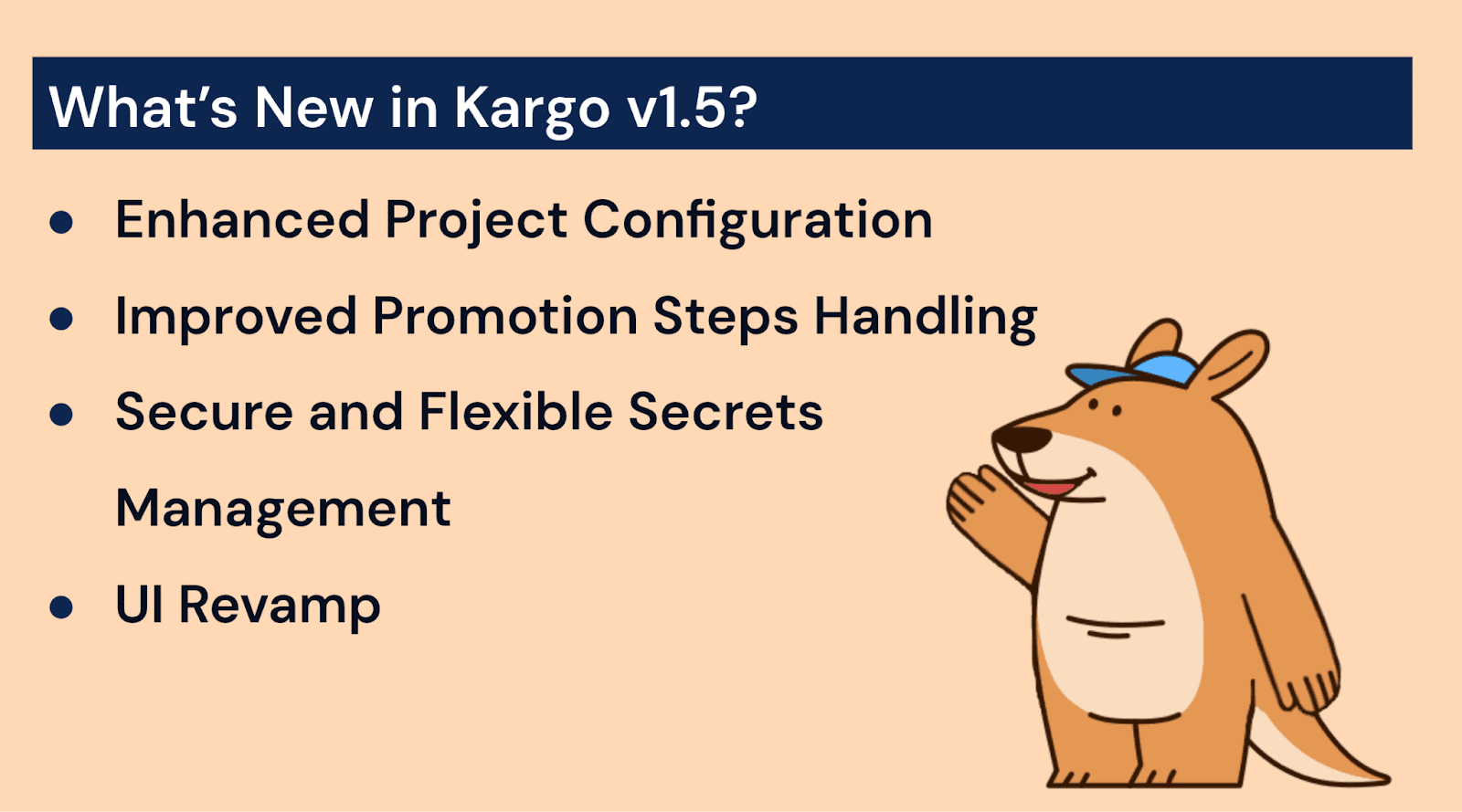
Here’s a quick rundown of the new features:
Enhanced Project Configuration
Improved Promotion Steps Handling
Secure and Flexible Secrets Management
UI Revamp
Before we unpack the exciting new changes in Kargo, let’s review:
What is Kargo?
Kargo is a continuous promotion orchestration layer created by the minds behind the Argo Project. Continuous promotion is a GitOps-driven approach that automatically moves (or promotes) application versions or configurations across environments (e.g., from development to staging to production). Promotions are based on predefined rules or signals, eliminating the need for manual intervention.
Without the use of Continuous Promotion tools such as Kargo, developers need to manually promote code from one environment to another. This manual process often involves tedious tasks, including approvals, scripts, and merging branches, and is prone to human error.
By comparison, Kargo carries out the steps for promotion automatically when certain conditions (if/else statements, waiting on an event to be successfully finished, etc) are met. A common use case for Kargo would be to move an app from development to staging to production. Let’s say a new version of an app is deployed to dev and passes tests, then Kargo will promote it to staging using the same image. If the app passes tests or is successful in staging, Kargo promotes it to production—no manual steps needed. The result - Kargo enables releases to be faster, safer, and more consistent.
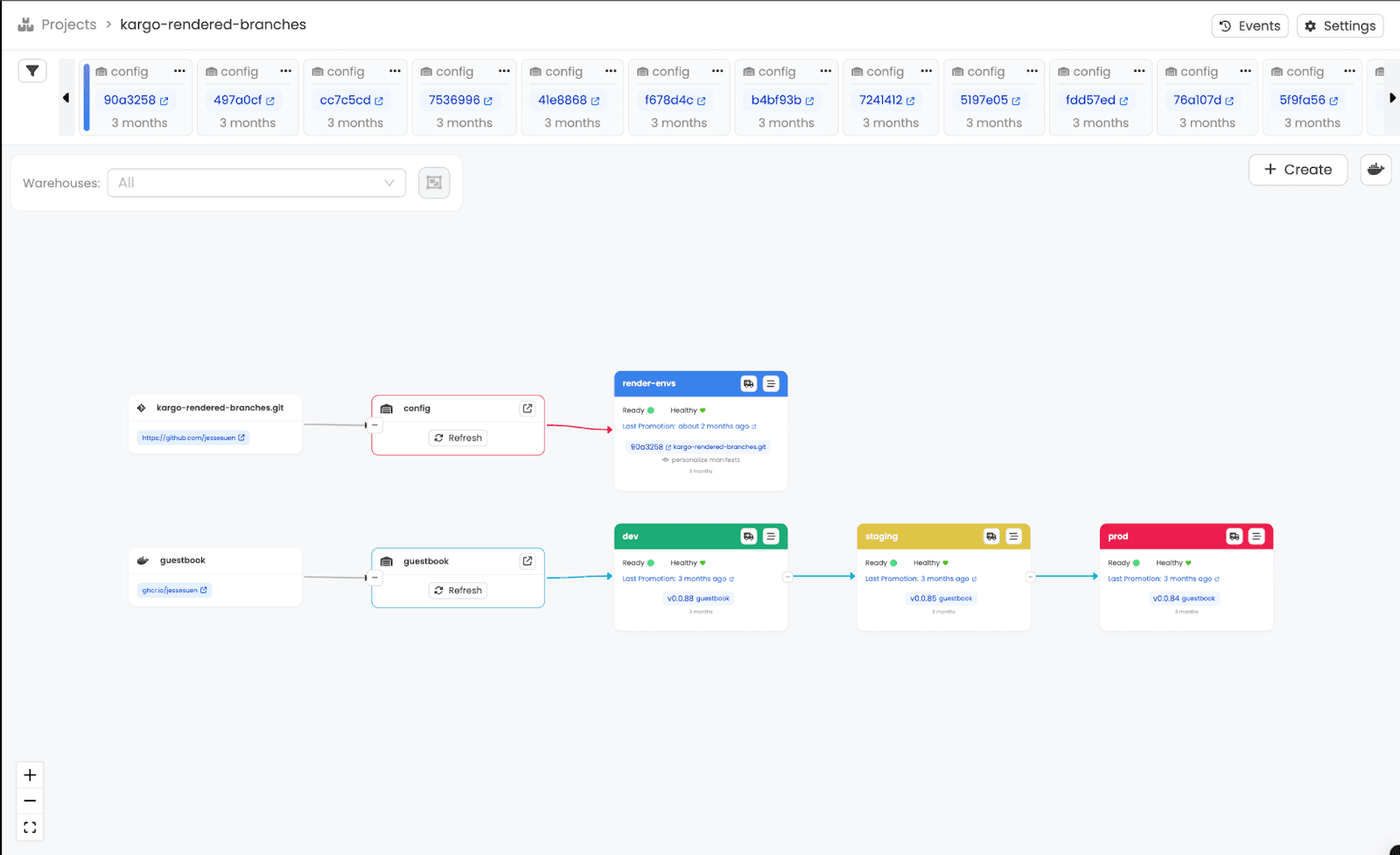
Here’s an example of the pipeline view in Kargo, with the colored tabs as the stages, or environments, and the freight being the images at the top:
Why Use Kargo?
Kargo’s method of code promotion provides several perks for DevOps teams, such as:
Faster Software Delivery
Allows quick progression once the code passes checks and is ready and stable.
Lower Operational Overhead
Eliminates manual promotion tasks (such as creating pull requests for staging)
Improved Consistency
Reduces the risk of skipping promotion steps or deploying incorrect versions.
Better Feedback Loops
Teams see their changes progress through environments automatically.
Auditability and Traceability
Since promotions happen via Git, every step is tracked, reviewed, and reversible.
The improvements added in the 1.5 update aim to make promotions even more flexible and straightforward. Let’s take a look at one of the major improvements: project configuration.
Easier Project Configuration with ProjectConfig
Prior to Kargo v1.5, the Project resource used a spec field to define its configuration. In practice, this approach proved awkward and challenging to manage. Permissions for handling Project-level resources, such as warehouses, stages, etc., are managed at the Project level.
However, the Project resources themselves are cluster-scoped, which means the permissions to update or delete the Project resources could not be managed within the Project namespace itself. This disconnect created a challenge: Project administrators often had to depend on system-level Kargo administrators to grant extra permissions or to perform updates and deletions on their behalf.
Why ProjectConfig Matters for Admin Access and Permissions
To combat this issue, Kargo v1.5 introduces a new resource called ProjectConfig. This resource is namespaced at Project-level, which allows project administrators to manage permissions such as the ability to update and delete project configurations. These permissions are now automatically granted to the Project-level Kargo-admin role whenever a Project and its namespace are created.
If you’re upgrading from an earlier version of Kargo, the migration is seamless, as changes such as the definition of promotion policies have moved from the Project resource to the ProjectConfig resource. It is important to note that the Project resource’s spec field will be removed in Kargo’s 1.7 release.
By reducing reliance on system admins for Project configuration update, the ProjectConfig resource can smooth out workflows.
The ability for Project admins to delete projects independently is on the Kargo roadmap and will be available at a future date.
To summarize, ProjectConfig reduces complexity, empowers Project admins, and adds powerful new capabilities to promotion policies, making Project management easier and more secure.
Improved Promotion Steps Handling
In previous releases, if a promotion step was skipped (meaning the if condition in the step evaluated to false), it was still marked as successful. This made it difficult to determine whether a step had run or was skipped.
No more guesswork – Kargo v1.5 now properly labels skipped promotion steps.
This makes it easier to understand what happened during a promotion, especially when debugging.
Context-Aware Step Execution for Cleaner, Safer Promotions
A major improvement introduced in Kargo v1.5 is context-aware step execution. “Context aware” means that steps can look back at whether the previous step succeeded or failed first before carrying out an action or a function.
Here are some examples of functions and their expression forms:
always()always returns true, so using${{ always() }}allows a step to run regardless of what happened in previous steps, which can be beneficial for cleanup tasks.
failure()returns true if any previous step failed, so${{ failure() }}runs a step only in the circumstance of failure, which can be beneficial for error-handling tasks.
success()returns true if all previous steps has either succeeded or were skipped, so${{ success() }}runs a step only in that circumstance.
If a promotion step’s if field is not in use, that step's execution depends on all prior steps having either succeeded or failed (returning the success() or failure() functions). Just as if the if field had contained the expression: ${{ success() }}. Users can view the status of any individual using the status() function. For example, the expression: ${{ status("my-name") == 'Errored' }} will permit a step to execute only if the step (“my-name”) has returned the status “errored”.
Lastly, a new continueOnError field can be set to “true” to specify that a step that errors or fails should neither affect the evaluation of the failure() and success() functions, as described above, nor influence the overall outcome of the promotion.
In summary, context-aware step execution provides you with greater control over how your pipelines behave, particularly in complex or failure-prone workflows.
Git Authorship Configuration
Kargo v1.5 brings greater flexibility and usability to several promotion steps. The release introduced support for specifying Git authorship details in the git-clone and git-commit promotion steps, which includes information such as author name, email, and signing keys if you're using commit signing.
When you define authorship in the git-clone step, that information automatically applies to all commits made by any subsequent git-commit steps. This is helpful for consistency.
However, if you want to override the authorship for a specific commit, simply specify different authorship in the git-commit step, which takes precedence over the setting in git-clone.
Git Authorship Configuration provides fine-grained control over commit metadata, which is beneficial for auditability and traceability in multi-user or automated workflows.
Pull Request Integration and Bitbucket Support
The git-open-pr promotion step now exposes a pull request URL field in its output, which can be pretty handy to have in Kargo.
How is this helpful? Users can now reference the pull request URL in any downstream step. If a user sends a Slack message using the HTTP step, you can now include a direct link to the newly opened pull request, making the process more informative and actionable.
Additionally, the git-open-pr and git-wait-for-pr promotion steps now officially support Bitbucket.
This enhancement enables users working with Bitbucket repositories to fully automate the opening and tracking of pull requests as part of their Kargo workflows, just as they would with GitHub or GitLab.
Shout out to @chamodshehanka for contributing this feature. It’s another step toward making Kargo more inclusive of the tools you're already using in your CI/CD stack.
Improved Workload Identity Support in GKE
Kargo utilizes ambient credentials to access container registries, specifically the Elastic Container Registry on EKS and the Google Artifact Registry on GKE.
Kargo is a multi-tenant system and follows the principle of least privilege by assuming Project-specific IAM roles when accessing container registries. This gives admins flexibility in managing Project-specific roles, so admins can simply grant permissions to the controller directly.
Kargo v1.5.0 introduces the fallback option on GKE. GKE users can now enjoy the same fallback behavior, making access smoother and admin life more manageable.
Secrets and ConfigMaps Configuration
Kargo now makes it easier to access ConfigMaps and Secrets in expressions with the new config() and secret() functions. These functions are faster, enabling users to access their config maps and secrets more quickly. This latest update replaces the old secrets map, which will be removed entirely in v1.7.0.
UI Improvements
New update, new look! We’ve made improvements to the UI so users can navigate with ease and get a deeper look at their promotion process. Kargo’s UI updates include:
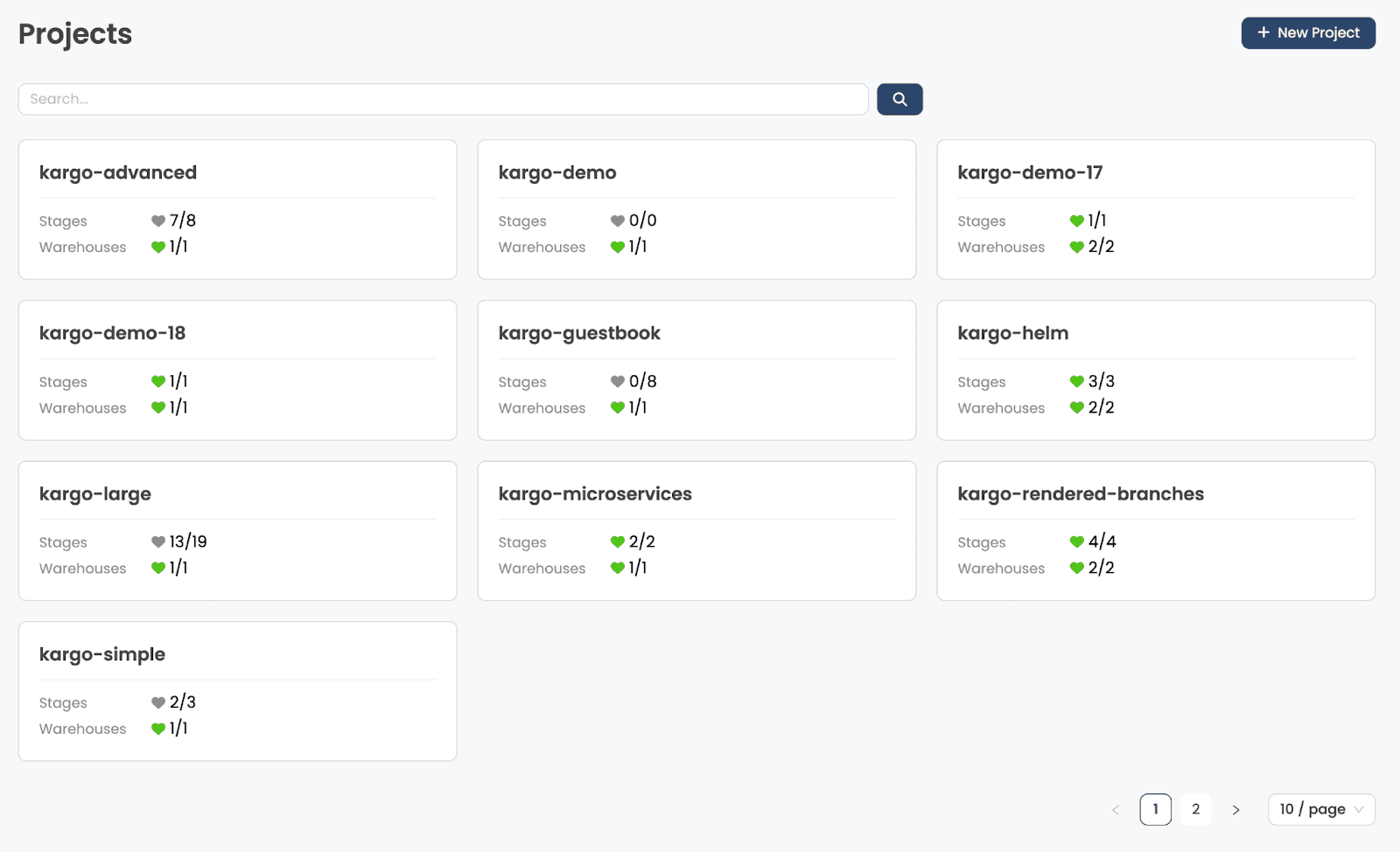
Revamped Projects List view: We’ve removed the inline stage display and added the number of stages and warehouses for transparency, as well as aggregated health status.
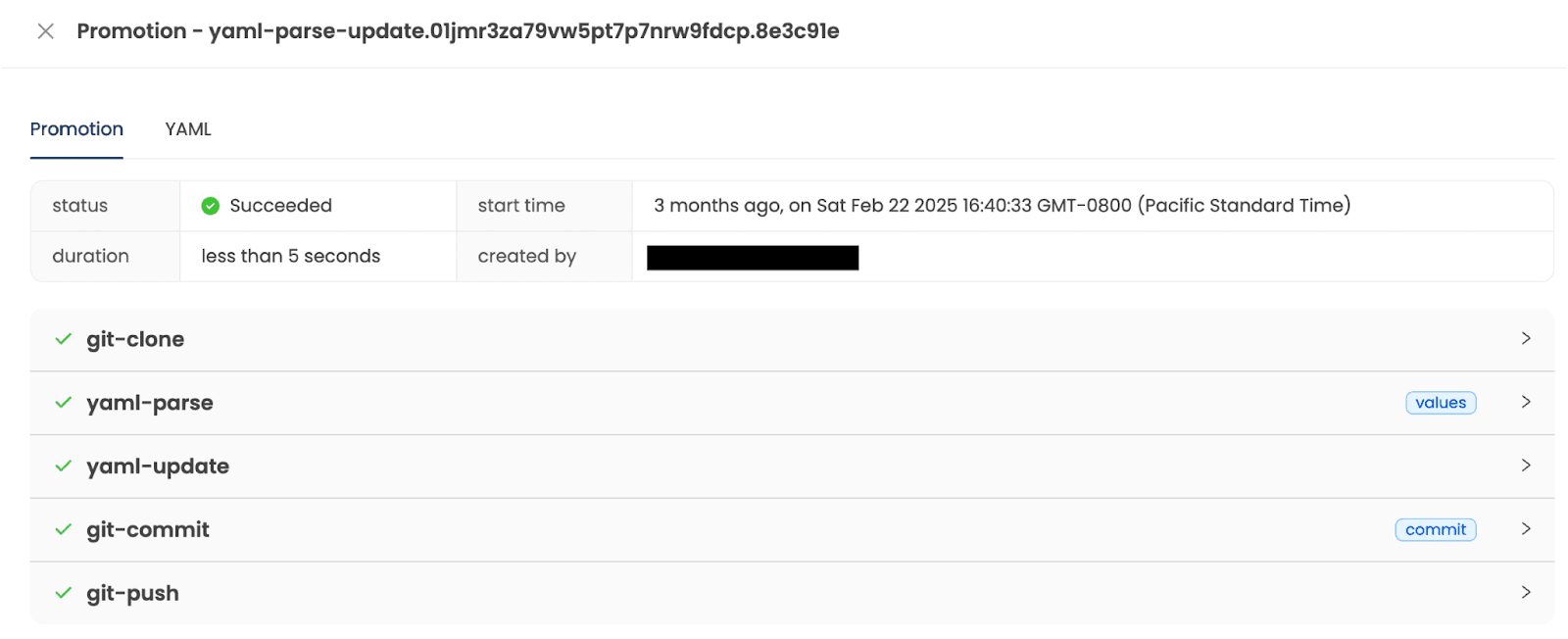
New Promotion steps view: Stage view is now separate from promotion steps view. Now users have more transparency and can follow the promotion process step-by-step.
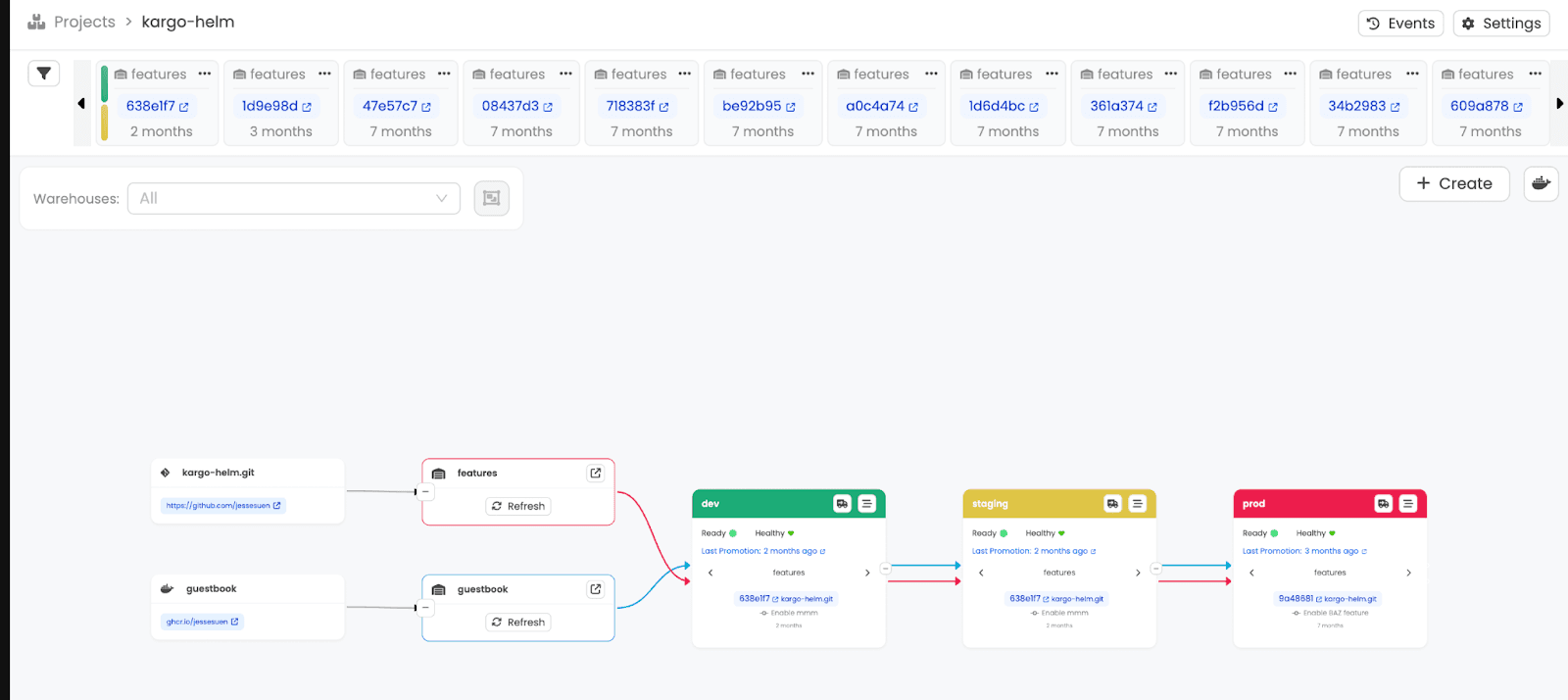
Pipeline View Redesign: Now featuring a compact freight timeline, a warehouse filter for better grouping, a stage list view with filters, and downstream stages are now hidden when scaled.
That’s just a sneak peek of the UI updates. We encourage users to upgrade to v1.5 to explore all the improvements for themselves.
Breaking Changes and Deprecations
With all these significant improvements, be careful if you’re migrating from earlier versions. Several breaking changes and deprecations have been introduced in this update as well. Notably, the commitFrom(), imageFrom(), and chartFrom() functions now return nil instead of an error when no matching artifact is found. In turn, making expressions easier to work with using nil coalescing and optional chaining.
Please note that the phase and message status fields in Project and State resources have been entirely removed. The messageFromSteps field in the git-commit promotion step has also been removed, with users now encouraged to use expressions in the message field instead. Additionally, the undocumented label kargo.akuity.io/project-secret: true, which was briefly introduced and deprecated in earlier versions, no longer has any effect.
As mentioned before, the spec field in Project resources is now deprecated and will be removed in v1.7.0; instead, configuration is handled through the new ProjectConfig resource. The gitRepoURL field in Warehouse resources is also deprecated and will be removed in v1.7.0, replaced by the OCI image annotation org.opencontainers.image.source for linking images to their source repositories. Lastly, the secrets map in expressions has been deprecated in favor of the new secret() function, which performs better and offers cleaner access to secret values.
New Arrival – Welcome, Faris!
The Kargo team is excited to welcome our newest maintainer, @fuskovic! You may notice improved promotion step timeout accuracy with this new update – kudos to Faris for this major contribution!
Big Thank You to Our First-Time Contributors
We’d like to thank the Kargo Community for their support and contributions to the project. This release would not have been possible without your support. Special shout-out to our first-time contributors:
Hop on Down the Kargo Rabbithole
Interested in learning more about our Continuous Promotion tool Kargo and its numerous benefits? Check out these helpful resources:
Missed out on the last update and need a refresher? Check out what was introduced in Kargo v.1.4.
Try it Out!
Interested in these major improvements? That’s just the tip of the iceberg… Kargo v1.5 also includes many smaller features and bug fixes. Check out the full release notes here. Kargo v1.5 is out now, and we encourage you to explore everything the latest version has to offer!
