Supplying Custom Values Files to Helm Charts in Argo CD
Nicholas Morey
In this blog post, we will dive into a common challenge developers face when using Argo CD — an innovative Kubernetes application deployment and management tool. We'll explore how to supply custom values files to a Helm chart sourced from a Helm chart repository within an Argo CD application. This situation arises when you want to use a Helm chart that you don't maintain but need to override some default values with your own custom ones managed in a Git repository, following GitOps best practices.
Before we dive into the solutions, we invite you to check out our free course on GitOps and Continuous Delivery. Developed by the founders of the Argo Project, this course offers hands-on experience in implementing these practices with Argo CD.
Check out our YouTube video at the end of the blog for an in-depth look with demos of the solutions presented in this blog post.
Understanding the Challenge: Managing Argo CD Helm Values
The challenge we face is sourcing a Helm chart from a Helm chart repository and custom values from a Git repository simultaneously. This creates a need for a solution that allows for the easy integration of values management within GitOps best practices, while also ensuring that the chart itself is sourced and maintained separately, often by third parties. Without a proper solution, this can result in complications around versioning, consistency, and deployment across different environments.
In this blog, we’ll examine three common solutions to this challenge, each with its own pros and cons, and help you determine the best approach for your specific needs. Let’s dive in!
Solution 1: Using a Helm Umbrella Chart
The first solution involves creating a Helm umbrella chart that includes the Helm chart from the repository as a dependency. The custom values are then maintained in the same Git repository as this umbrella chart. This approach allows you to source the Helm chart and values files from Git within an Argo CD Application.
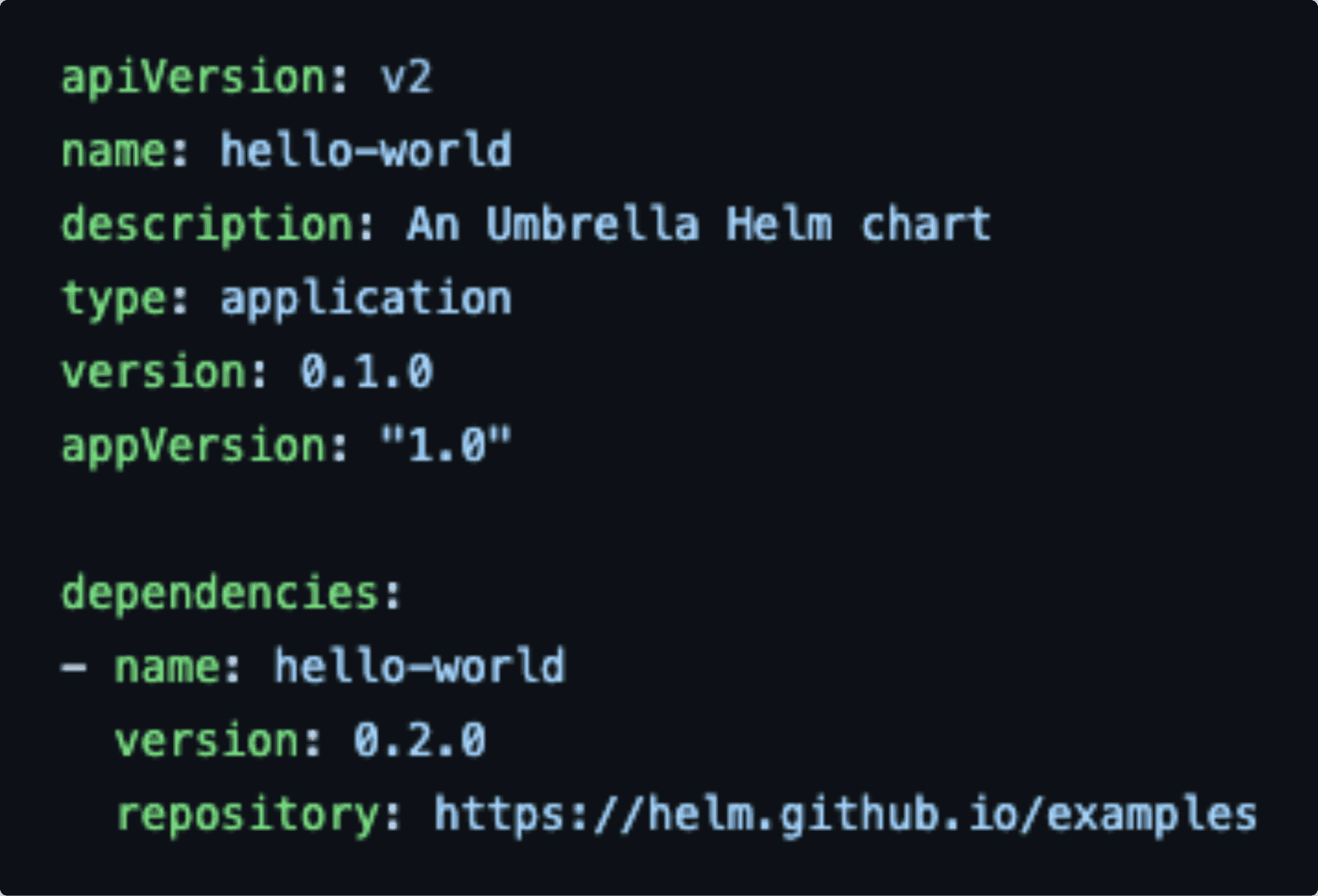
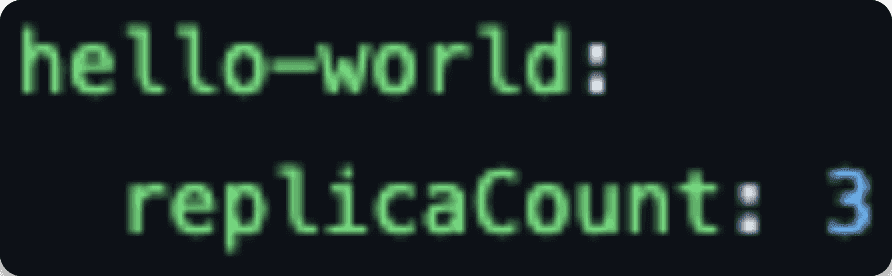
It's important to note that any values you want to supply to a chart dependency must be under a top-level key in the values files with the same name as the Helm chart dependency. In our example chart YAML, we've got a dependency named `hello-world; in the values files, it's got `hello-world as the top-level key.
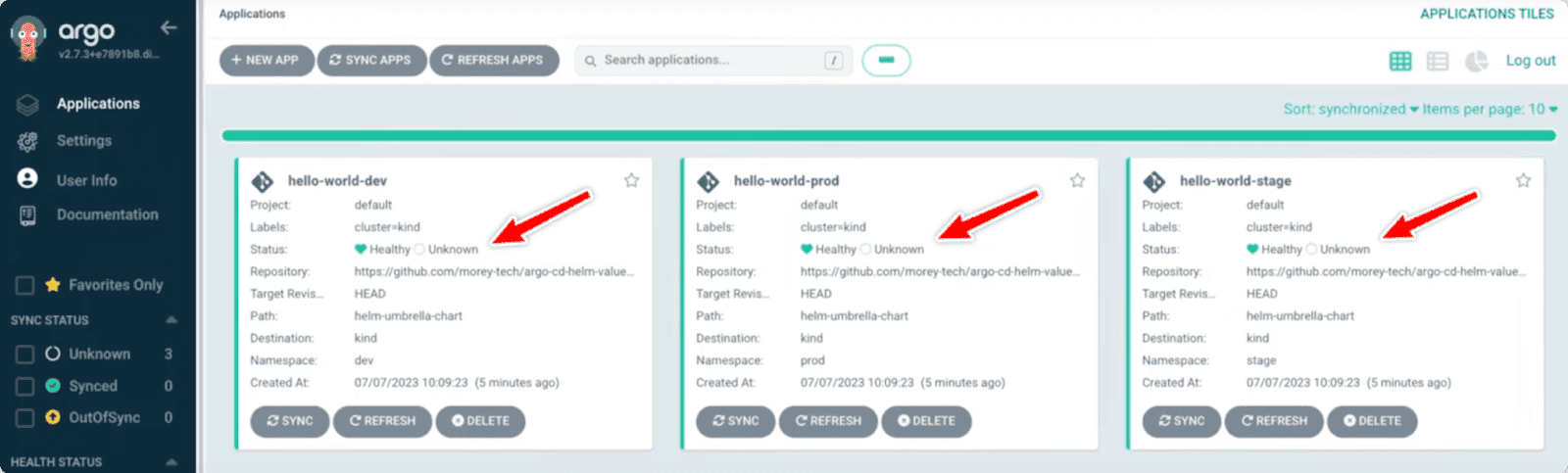
However, the downside with this approach is that if all three of my applications are tracking the same revision of my Git repository and then, therefore, the same revision of the Helm umbrella chart, when I update the dependency in the chart, YAML, it will affect all three applications.
Solution 2: App of Apps Pattern with Values in Application Manifest
The second solution is to place the custom values directly in the Application manifest instead of separate values files. This approach works well when adopting the App of Apps pattern for managing your Application manifests in Git. It allows you to pass the Helm values directly to the chart hosted in the Helm chart repository while keeping the values in Git. This provides GitOps for the entire application and allows each Application variation to have a different target revision of the Helm chart.

Solution 3: Multiple Sources for Applications (Beta Feature)
The final solution utilizes the Multiple Sources for Applications beta feature introduced in Argo CD version 2.6. This allows you to specify multiple sources for the Application manifest, including Helm chart repositories and Git repositories for values files. This approach combines the benefits of using the Helm chart repository and Git for custom values, enabling easier management of applications with distinct target revisions for different environments.

Choosing the Right Solution for Argo CD Helm Values
Choosing the right approach depends on your specific requirements and preferences. While the Helm umbrella chart solution might be the most elegant currently, the Multiple Sources for Applications feature shows promise for the future. It's vital to consider factors like application complexity, versioning, and ease of management when making your decision.
To better understand how to implement these solutions in your workflows, we invite you to check out our detailed demo linked below. In the video, we walk through the different methods, showcasing how each approach works in action with real-world examples.
Additional Resources
Loved this blog post? Enhance your Argo CD learning journey with these great resources:
[Blog Post]: Unlocking Ultimate Argo CD Flexibility
[Blog Post] Unlocking Ultimate Argo CD Scalability
[Blog Post]: Argo CD Architecture Redesigned
[Video] Creating a Fully-Managed Kubernetes GitOps Platform with Argo CD
Frequently Asked Questions on Helm Files
What are Argo CD helm values?
ArgoCD Helm values are configuration settings for a Helm chart that determine how the chart is deployed, such as image tags, replica counts, or feature flags. They can be provided via YAML files, inline values in the ArgoCD Application manifest, or structured objects, with later values overriding earlier ones. These values allow you to customize deployments without modifying the original Helm chart. Using ArgoCD, you can manage these values in Git to maintain a consistent, reproducible deployment process.
Does Argo CD integrate with helm charts?
Yes, ArgoCD integrates with Helm charts by rendering them using helm template and then applying the resulting Kubernetes manifests directly to the cluster. This lets ArgoCD manage Helm-based deployments via GitOps without relying on Helm to track releases. You can use value files and overrides to control the deployment configuration. This approach combines the flexibility of Helm charts with the GitOps workflow of ArgoCD.
What are Argo CD helm chart values?
ArgoCD Helm chart values are configuration settings that control how a Helm chart is deployed, such as image versions, replica counts, or feature options. They can come from YAML files, inline values in the ArgoCD Application manifest, or structured objects, with later values overriding earlier ones. These values let you customize deployments without changing the original chart. ArgoCD uses them to render the chart and apply the resulting Kubernetes manifests to the cluster, ensuring consistent, Git-managed deployments.
How do Argo CD helm values and helm chart values differ?
Regular Helm values are the configuration settings you provide directly to Helm when you run commands like helm install or helm upgrade. Helm uses them to render the chart and manage the release in the cluster, tracking it in its own release metadata.
ArgoCD Helm chart values serve the same purpose in defining chart configuration, but ArgoCD doesn’t manage Helm releases itself. Instead, it uses helm template to render the manifests with those values and then applies them to the cluster as regular Kubernetes resources, managing them through GitOps.
Essentially, the values themselves are the same, but ArgoCD’s workflow applies them in a GitOps-driven, Helm-templated way rather than through Helm’s release lifecycle.
