GitOps Environment Promotion With Kargo’s Custom Steps
Heba Eid
Today, we're announcing Kargo’s Custom Steps in the Akuity Platform: a container-based extensibility model that lets platform teams define any promotion logic as a native step in their GitOps delivery pipeline. Any logic you can containerize — Terraform applies, OPA policy checks, security scans, internal change tickets — now runs inside Kargo, version-controlled and auditable alongside Kargo’s built-in steps.
First, let’s introduce Kargo - a universal promotion layer
Most developers in the GitOps and CI/CD ecosystem are familiar with Argo CD, a GitOps continuous delivery tool for Kubernetes. Kargo was created by the original creators of Argo CD, Hong Wang, Jesse Suen, and Alex Matyushentsev. With almost a decade of building developer tools in the software delivery ecosystem, they recognized the need for Platform Engineering and DevOps teams to have a multi-stage environment promotion tool, so they built Kargo.
What is Kargo?
Kargo is a GitOps-native continuous promotion tool that automates moving changes through environments — dev to staging to production — by orchestrating a sequence of promotion steps that update Git, render manifests, and sync Argo CD applications. Since its launch, Kargo has seen strong adoption by leading organizations such as Deutsche Telekom, JumpCloud, Cisco ThousandEyes, and many more.

Figure: Kargo: GitOps Universal Promotion Layer
Kargo orchestrates promotion across environments by treating each stage's confirmed state as the source of truth for the next. A change merged to dev doesn't move to the next environment until Kargo has executed every step in the promotion sequence.
While Kargo was originally built for Kubernetes, we discovered that many organizations operate across hybrid environments, including Kubernetes, VMs, Terraform-managed infrastructure, serverless workloads, and more. Today, Kargo is a universal promotion layer that can be leveraged across all of your organization’s environments.

Why platform teams need a universal promotion layer
Argo CD has become the de facto deployment tool for Kubernetes. According to the 2025 CNCF Argo CD Survey, 97% of respondents run Argo CD in production, and a broader CNCF survey reports that almost two-thirds of teams running Kubernetes also use Argo CD.
In the same survey, respondents were asked how they promote applications across environments. 67% of respondents shared that their teams rely on manual processes or custom scripts to move applications between environments. With so much of the software delivery pipeline being automated, the lack of consistent tooling for environment promotion across stages is a painful gap. Kargo was created to fill that gap.
Kargo’s Built-In Steps: Covering the Most Common GitOps promotion operations
Kargo ships with a library of built-in promotion steps covering the most common environment promotion operations: Git workflows, Argo CD syncing, Helm and Kustomize rendering, and OpenTofu infrastructure management. Kargo’s built-in steps cover most GitOps promotion workflows.
As Kargo adoption expanded within organizations, we discovered a need to expand Kargo’s capabilities beyond foundational GitOps promotion. Security teams needed compliance guardrails, application teams wanted to integrate with CI tools, platform teams needed to encode org-specific promotion logic, and much more. To enable Kargo to serve the diverse needs across organizations, we built Custom Steps.
Custom Steps is a container-based extensibility model that provides platform teams with a native way to define promotion logic directly in Kargo.
Introducing Custom Steps: Container-Based Extensibility
Today, we're announcing our Kargo offering with Custom Steps on the Akuity Platform: a container-based interface for defining any environment promotion logic your team controls, your organization shares, and Kargo executes natively, as a step that sits right alongside built-in steps in the promotion sequence.
Custom steps are packaged as OCI images and registered cluster-wide by a platform engineer. Once registered, any team in the cluster can reference a custom step by name in their promotion templates. Each step runs in a Kubernetes Pod at execution time, with its inputs, outputs, and result recorded in the Kargo promotion record alongside every other step in the sequence.
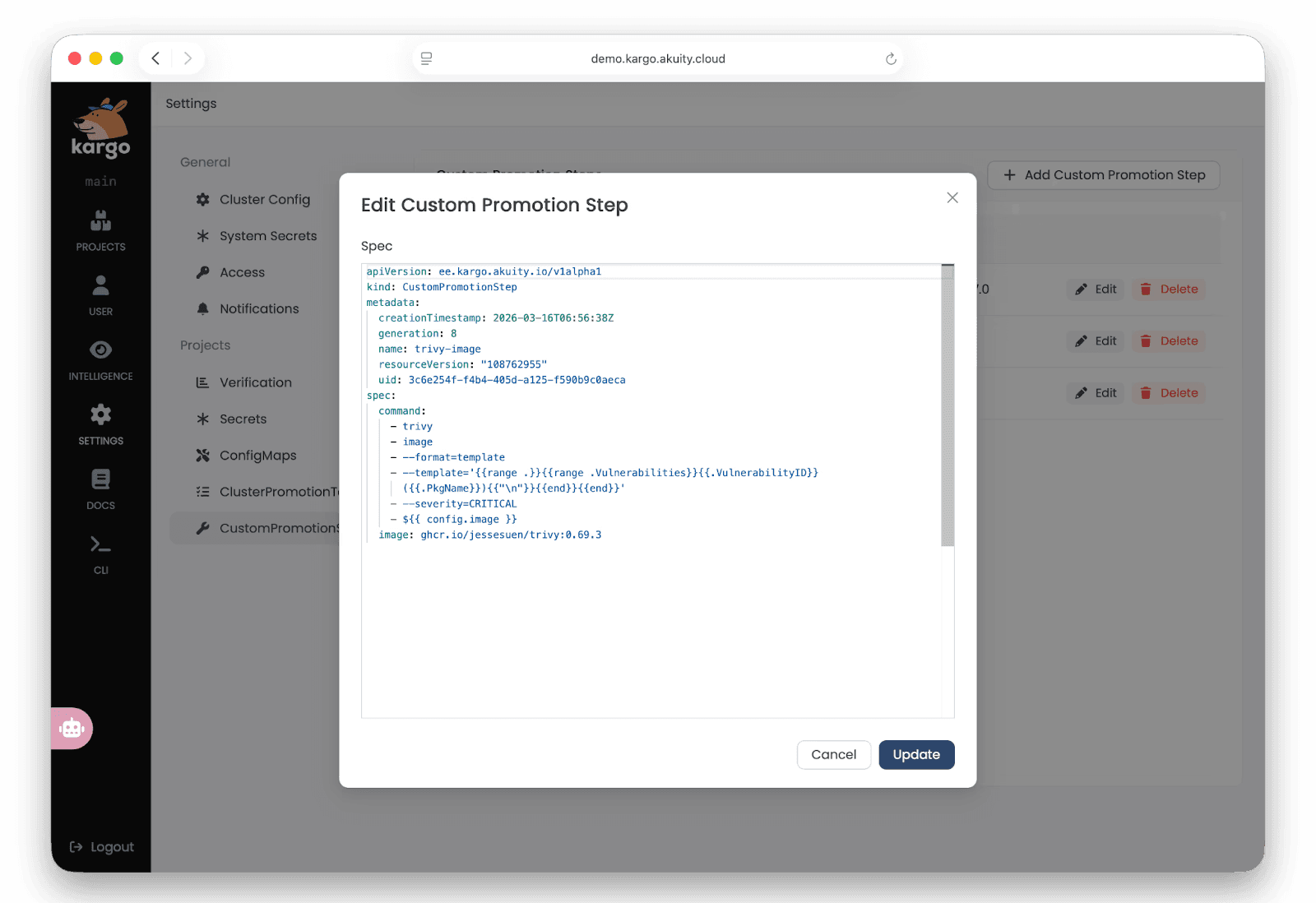
Figure: Editing Custom Promotion Steps from Kargo’s UI
What you can build with Custom Steps
In addition to the core environment promotion capabilities, such as moving applications from dev to staging to prod, platform teams often need to accommodate additional use cases, such as:
Supply chain security: Sigstore signatures, SBOMs, and attestations can be verified during the promotion step.
Image vulnerability scanning: Container images or manifests need to be scanned for vulnerabilities mid-promotion, blocking advancement if critical issues are found.
Change management: An environment promotion needs to be registered with internal systems for audit, compliance, or governance purposes.
Policy scanning: Manifests need to be validated against policy rules before reaching a higher environment.
Integrate with internal systems: Call internal APIs, send data to in-house platforms, or act on a user's behalf within systems that Kargo has no native knowledge of.
Bespoke deployment process: Execute org-specific deployment logic that doesn’t fit any standard pattern.
Environment validation: Validate that the target environment is in the expected state before a deployment goes live.
To implement the above use cases, platform teams need to integrate with external systems and tools. For example:
Ansible / Puppet: To run infrastructure configuration tools as a prerequisite to ensure the target environment is ready before promotion proceeds.
CI Tools (Jenkins, CircleCI): To trigger CI pipeline jobs or test suites as part of the environment promotion sequence and wait for the results before allowing the promotion to succeed.
OPA / Kyverno: To scan rendered manifests against policy rules and block the promotion if violations are found.
Trivy / DAST / SAST: To scan container images or manifests for vulnerabilities mid-promotion and fail the step if critical issues are detected.
In-house change management tools: To call an internal API to register the promotion, update a CMDB, or trigger an internal approval workflow.
Custom Steps enables teams to write the custom logic needed to achieve the above-mentioned use cases and integrations. Now, engineers can drop a container-based script anywhere in the promotion sequence to handle the bespoke logic.
Why should teams use Custom Steps?
Custom Steps offers a wide range of benefits for platform teams, including:
Integration with existing tools: teams can now bring internal and third-party tools, such as Ansible and OPA, into the environment promotion sequence without requiring Kargo to natively support them. Users can also reuse existing scripts and tooling without rewriting them.
Build once, use everywhere: Custom Steps are registered at the system level, making them usable by application and platform teams across the organization. This means that there is no duplication of logic across teams.
Flexible: As with built-in steps, Custom Steps can be inserted anywhere in the promotion sequence - before, during, or after core GitOps operations. You can also script conditional logic, dynamic outputs, and environment-specific behavior.
Auditability and compliance: Every step in the promotion sequence is version-controlled, traceable, and observable in one place. Org-specific compliance requirements (audit logs, change tickets, evidence records) become part of the promotion contract rather than a separate manual process.
How Custom Steps Work: Register Once, Use Anywhere in the Promotion Sequence
Custom steps follow a two-stage pattern:
Register: Custom steps have to be registered in Kargo to be used in promotion templates.
Use: Platform engineers can then use the configured Custom Steps in their promotion templates.
#1. Register the Custom Step
Custom steps are registered cluster-wide by a Kargo admin as a CustomPromotionStep resource. Once registered, the step is available for any team in the cluster to reference in their promotion templates.
This defines a step named sleep that runs a shell command inside an ubuntu container. The ${{ config.sleepSeconds }} expression is a placeholder for a value passed in at runtime.
#2. Use the Step in a Promotion Template
Once registered, reference the step by name using uses: in a promotion template or task, and pass input values via the config: block:
In the example above, config.sleepSeconds resolves to 10 at runtime, making the effective command:
You can also pass dynamic values from variables defined elsewhere in the promotion template:
For a detailed walkthrough on using Custom Steps, visit Kargo’s technical documentation here.
Book a Demo Today
Custom Steps is available as part of Kargo Enterprise, giving teams a native way to extend Kargo promotion workflows with organization-specific logic. If you want to learn more about Custom Steps, book a personalized demo today.
Want to keep learning?
Read the full technical Custom Steps documentation
Start a free trial today
Watch this 5-minute presentation on Custom Steps by Kargo creator, Jesse Suen
Sign up for a live Custom Steps webinar on April 9
Share feedback with the Kargo team via the Akuity Discord community or GitHub
