How to Integrate CDK8S with Argo CD Using Config Management Plugins
Mayursinh Sarvaiya
If you haven't stored raw kubernetes YAML files in your GitOps repository, you most probably used some sort of tooling that generates YAML files, for example tanka, helmfile and cdk8s.
Argo CD doesn't include these tools "natively" but gives a way to integrate with them using Config Management Plugins.
This enables you to write manifests in any tool and CMPs would process them and provide raw manifests to Argo CD.
CDK8S Integration
Cloud Development Kit for Kubernetes (CDK8S) is a tool where you define manifests in one of the following programming languages: Typescript, JavaScript, Golang, Python or Java.
To properly integrate CDK8S with Argo CD, we need to write configuration for `init` and `generate` in CMP. In this case `init` would install dependencies for selected
programming language. For example, Typescript requires npm install while Python pipenv update.
Argo CD needs the final output in raw YAML, so the below command is common for all languages to generate.
This tells us that Argo CD would need cdk8s CLI, CLI for the programming language used, CLI for dependency management tool, programming language used to run CDK8S (NodeJS). In order for this to work, we would need a Docker image with all of these tooling available, while also make sure that only the required tooling is available inside the image.
At the time of writing this, there is no unified place with support of all available programming languages in CMP.
Introducing OSS repository for CDK8S
We have prepared an open source repository with all available programming languages supported in CDK8S. You can visit it at: https://github.com/akuity/cdk8s-cmp to know more.
We also encourage you to use the Docker images on ghcr.io/akuity/cdk8s-cmp-<typescript/go/python/java>. See all available versions here.
To integrate with an existing workflow, you first would need to attach the container to `repo-server` and then inject the plugin definition.
You would need to inject plugin configuration from ConfigMap. Here is the example plugin.yaml for Golang.
CDK8S Integration Inside the Akuity Platform
If you have your Argo CD instance on Akuity Platform then you are just a few clicks away to integrate the CDK8S config management plugin of your choice of programming language.
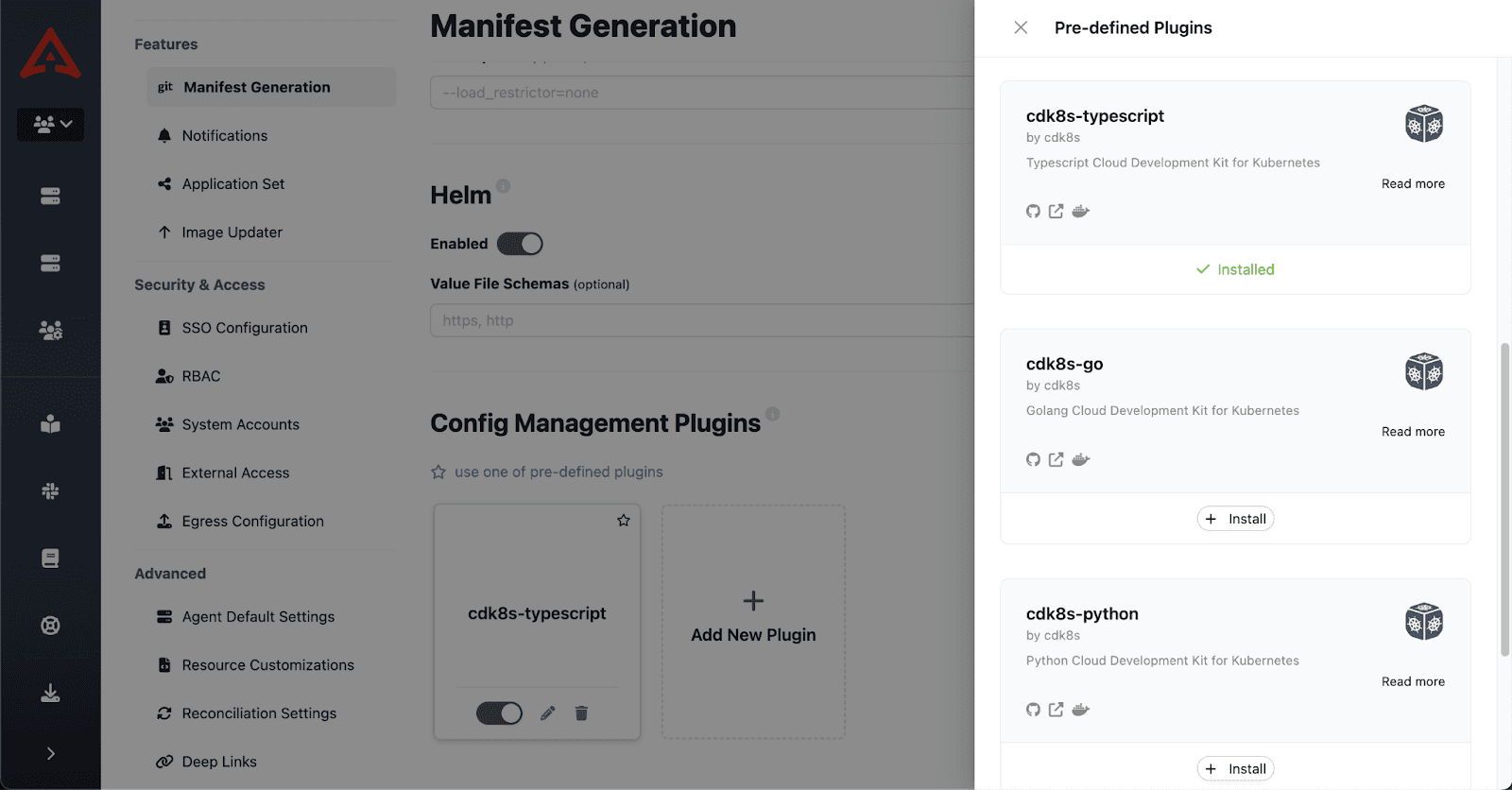
Simply go to instance Settings > Manifest Generation and click on "Use one of pre-defined plugins". Then install the CDK8S plugin you want to use.
We hope that this integration will make your life easier.
Additional Resources
Loved this blog post? Want to learn more about Argo CD Config Management? Check out these helpful resources:
[YouTube Video]: Argo CD Config Management Plugin Crash Course:
[Blog Post] Config Management for Argo CD
Questions? Join our Akuity Community Discord
Want to see Managed Argo CD on the Akuity Platform? Book a demo today!
